
10% OFFGrab your exclusive coupon code · Ends in00d00h00m00sGet Coupon
Contact actions bar

GHL contact quick actions that start the job in one tap

GHL contact quick actions put buttons and one-tap tags on every contact page. A tap adds or removes a tag, which starts any GoHighLevel workflow that listens for it, and a button can open a short form that fills custom fields. The contact updates straight away. From Pipe Pro, $407 once.

Press the real bar
Maria R.Kitchen sink leak · sample contact
WO 2231

Tap a tag to try it. Nothing is sent.

Tag “Emergency” is on: the on-call workflow would start.

Live bench

The real bar, with plumbing tags

We loaded it with Emergency, Maintenance plan and Callback chips plus a Job details form. Tap, open the form, drag the bar. Nothing is saved from this page.

Valves · tap to change the preview

Show
Position
Theme

Opening the valve…

Buttons and tags The real contact actions bar on a sample contact. Tap a tag, open Job details, drag the bar by its grip. Nothing is saved or sent from this page.

Workflow recipes

Tags that start the right workflow

Examples you can build with GoHighLevel's own tag triggers. The bar only adds and removes the tags; your workflows decide what happens next.

One tapTriggerWorkflow it can start
Emergencytag addedPage the on-call tech and send the “we are on it” text
Tech on the waytag addedSend the ETA text with the tech’s name
Maintenance plantag addedStart the plan welcome sequence and yearly reminder
Ask for reviewtag addedSend the review request two hours after the job closes
Callbacktag toggledCreate a task for the office and remove it when done
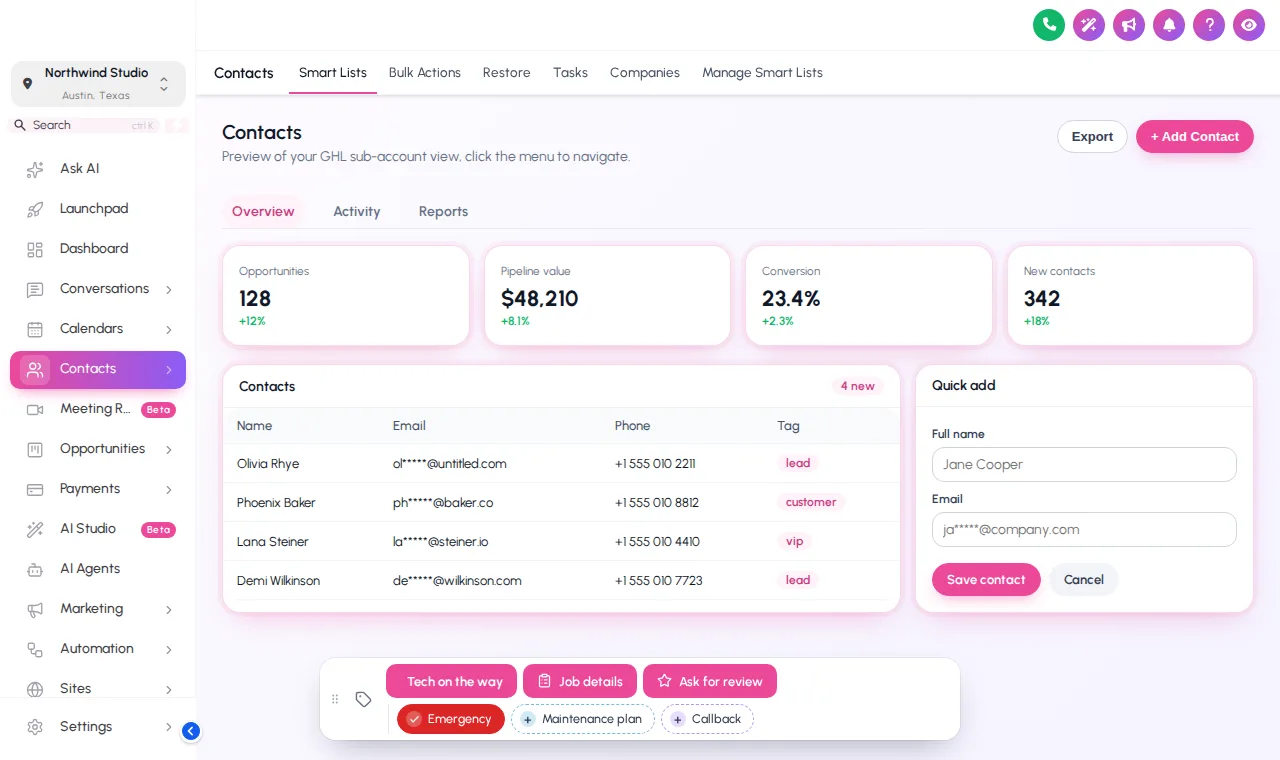
GoHighLevel contact page with a contact actions bar of plumbing quick tags and buttons
Contact page Quick tags: Emergency, Maintenance plan, Callback
Start positions
6Drag anywhere after that
Form field types
8Text to drop-down to phone
Taps to start a workflow
1Tag added or removed
Page reloads
0The contact updates in place

Mini forms that fill custom fields

A button can open a short form: water heater age, fixture count, gate code, job type. Each field maps to a custom field on the contact, and notes can record who changed what.

Three steps

Wire up the bar once

  1. Add quick tags and buttons

    In the contact actions tab, add the tags your team uses most and the buttons they press every day, with colors, icons and messages.

  2. Point them at your workflows

    Use the tags your GoHighLevel workflows already listen for, or map a button’s mini form to custom fields.

  3. Save

    The bar appears on every contact page, in the sub-accounts you chose, on the next page load.

Contact actions start at Pipe Pro

Line size ½ in

Quick Fix

$167 one-time

Stop the drip: your colors, a theme, dark mode and a branded login on every GoHighLevel screen.

This module is not in Quick Fix.

  • All 27 themes and 11 UI kits
  • Dark mode across GoHighLevel pages
  • Left sidebar or top-bar layout
  • Your logo and brand colors, with GoHighLevel's default blues remapped
Workspaces
1
Team
3
Templates
10
Domains
5

Best for: A one-shop plumbing company, or an agency putting its own brand on GoHighLevel before it rolls out client sub-accounts.

Most shops start here
Line size ¾ in

Pipe Pro

$407 one-time

Fix the flow: everything in Quick Fix plus dispatch-friendly menus, dashboards, pipeline boards and one-tap contact actions.

  • Everything in Quick Fix
  • Mega menus and the floating quick menu
  • Announcements bar
  • Sub-account self-service
Workspaces
2
Team
5
Templates
25
Domains
10

Best for: Plumbing shops with a dispatcher and two or more trucks, and agencies managing several plumbing sub-accounts.

Line size 1 in

Full Repipe

$827 one-time

The whole system re-run: everything in Pipe Pro plus popups, social proof, calculators and floating widgets that feed leads into GoHighLevel.

  • Everything in Pipe Pro
  • Popups: 43 templates, up to 15 live
  • Notifications and social proof: 94 templates, up to 15 live
  • Calculators: 134 templates, up to 10 live
Workspaces
3
Team
10
Templates
50
Domains
25

Best for: Multi-truck plumbing companies running their own marketing, and agencies that want to resell a branded customizer to plumbing clients.

Work order · FAQ

GHL contact quick action questions

Straight answers about the account, the install and what changes in GoHighLevel.

Lines
8
Status
Answered
Still stuck? Ask a person
01What is the contact actions bar?

A small bar of quick tags and buttons on every GoHighLevel contact page. One tap adds or removes a tag, and a button can open a short form that writes to the contact’s custom fields.

02Can a button start a GoHighLevel workflow?

Yes. Buttons add, remove or toggle tags, so any workflow with a tag added or tag removed trigger, such as “send on-my-way text” or “request review”, starts from one press.

03What can the mini forms fill in?

Any custom field in the sub-account: text, paragraph, number, date, drop-down, email, phone or link. A plumbing shop might capture water heater age, fixture count or access notes.

04How does it update the contact?

Through GoHighLevel’s own API using the signed-in user’s session, the same calls GoHighLevel’s interface makes, so nobody can do more than their GoHighLevel permissions allow.

05Does it leave a record of who pressed what?

If you want it to. Notes can be added to the contact saying which tag was added or removed and by whom, and which field changed from what to what.

06Where does the bar sit?

Pick one of 6 starting positions. Each person can drag it out of the way and it remembers the spot; a double-click on the grip puts it back.

07Which package includes contact actions?

Pipe Pro and Full Repipe, from $407 one-time.

08Is anything saved when I use the preview here?

No. The preview runs the real bar on a sample contact, but nothing is sent anywhere. Inside GoHighLevel the same taps update the contact.

Ready when you are

One tap from call to truck rolling

Contact actions, dispatch menus, dashboards and job boards in one account, plus every theme and login design.

See the dispatch menu
  • Login emailed within minutes (max 24 hours)
  • One-time payment, lifetime access
  • One line to install, about 2 minutes

GoHighLevel and HighLevel are trademarks of their owner. GHL Customizer accounts run on the independent GHL Customer Care customizer platform, sold here by the team behind the Plumbing Snapshot for GHL. We are not HighLevel, and not an official partner or reseller of it. Screenshots on this page are our own captures of the live preview engine on sample data.

GHL Customizer account

Open your work order

Package (one-time, lifetime access)
You pay today$407Pipe Pro, one-time payment, lifetime access
  • Login emailed within minutes (max 24 hours)
  • Secure payment by Stripe; card details never touch this site
  • We never ask for your GoHighLevel login

By continuing you agree to the terms and privacy policy. Your details are used for this order and your account login only.