
10% OFFGrab your exclusive coupon code Β· Ends in00d00h00m00sGet Coupon
Menus and navigation

A GHL custom menu that runs like a dispatch board

A GHL custom menu shows your team only the screens they use, in the order they use them. Rename, reorder and hide every item, pick a left sidebar, right dock or top bar, open sections as mega menus, and float a quick menu over every page. Mega menus and the floating menu start at Pipe Pro, $407 once.

Try the layouts
Live bench

Switch layouts and use the menu

Pick a layout, then a mega style, and hover or tap Sites inside the frame. The top-bar chips only appear when the top bar is chosen.

A starting recipe

The six-item plumbing dispatch menu

What we would build for a two-to-ten truck shop. Everything else stays reachable through search or a mega menu, it just stops crowding the screen.

Hiding an item takes it out of the menu; GoHighLevel user permissions still decide who can open what.

  1. 1Calls and textsConversations, renamed. The first thing a dispatcher opens, so it goes first.
  2. 2Job boardOpportunities, renamed, with the pipeline your jobs move through.
  3. 3ScheduleCalendars: who is where today and what is booked for tomorrow.
  4. 4CustomersContacts: history, addresses, equipment notes.
  5. 5InvoicesPayments, with its sub-pages opened as a mega menu.
  6. 6Price bookYour own link to the flat-rate price book or estimate sheet.

Every way the GoHighLevel sidebar menu can sit

Positions
3Left, right dock or top bar
Top bar styles
8Solid, Floating, Glass, Brand gradient, Underline, Segmented, Centered, Slim
Mega menu styles
8Columns, Split, Cascade, Tiles, Tabs, Icon rail, Accordion, Wide
Floating menu designs
83 layouts: bubble, dock, rail
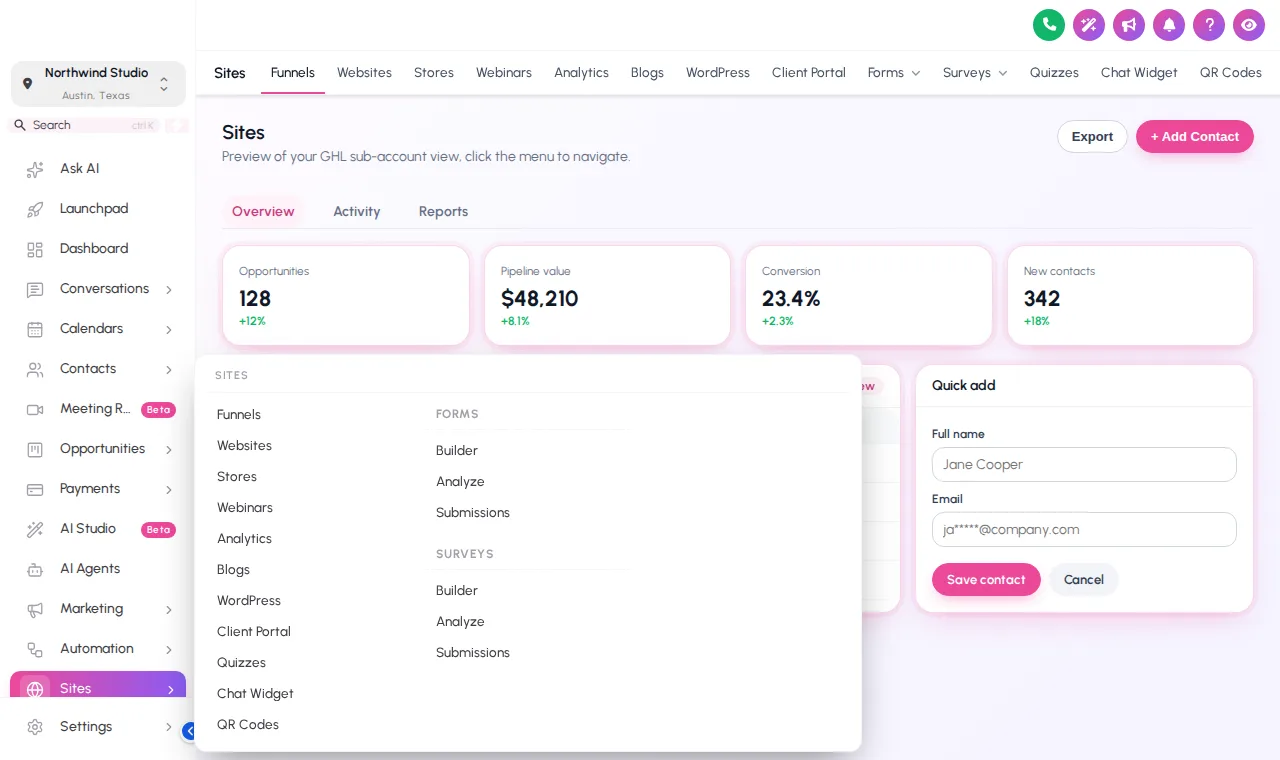
GoHighLevel sidebar with the Sites section opened as a mega menu in columns
Mega menu Sites opened as a column mega menu
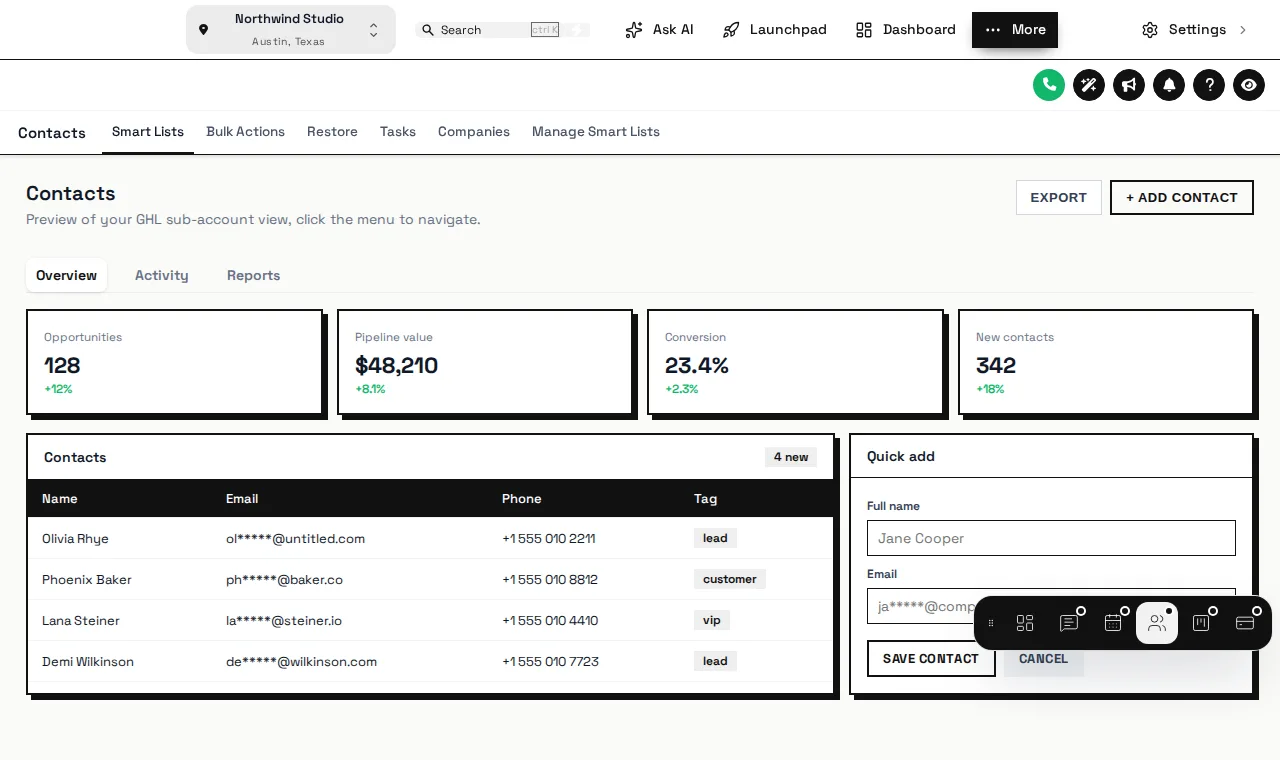
Floating quick menu as a dock bar over a GoHighLevel contacts page
Quick menu Floating dock with the pages a dispatcher uses most
Floating quick menu

Park the GHL floating menu where the dispatcher wants it

Open the bubble, hover the dock, drag it by its grip. It remembers where each person leaves it.

Valves Β· tap to change the preview

Layout
Design

Opening the valve…

Dock bar The quick menu floats over every page. Open the bubble, hover the dock or rail, and drag it by its grip.

Four steps

Rebuild the menu before lunch

  1. Drag the menu into dispatch order

    Open the menu tab, drag items into the order your office works, rename them and hide what nobody uses.

  2. Pick the layout

    Left sidebar, right dock or a top bar in 8 styles, with sub-menus as a list or one of 8 mega styles.

  3. Add the floating quick menu

    Choose the pages your dispatcher hits most and a layout: bubble, dock bar or side rail, in 8 designs.

  4. Save

    The agency view and every sub-account pick up the new menu on the next page load.

Which packages include custom menus

Quick Fix already lets you switch between sidebar and top-bar layouts. Mega menus and the floating quick menu need Pipe Pro or above.

Line size Β½ in

Quick Fix

$167 one-time

Stop the drip: your colors, a theme, dark mode and a branded login on every GoHighLevel screen.

This module is not in Quick Fix.

  • All 27 themes and 11 UI kits
  • Dark mode across GoHighLevel pages
  • Left sidebar or top-bar layout
  • Your logo and brand colors, with GoHighLevel's default blues remapped
Workspaces
1
Team
3
Templates
10
Domains
5

Best for: A one-shop plumbing company, or an agency putting its own brand on GoHighLevel before it rolls out client sub-accounts.

Most shops start here
Line size ΒΎ in

Pipe Pro

$407 one-time

Fix the flow: everything in Quick Fix plus dispatch-friendly menus, dashboards, pipeline boards and one-tap contact actions.

  • Everything in Quick Fix
  • Mega menus and the floating quick menu
  • Announcements bar
  • Sub-account self-service
Workspaces
2
Team
5
Templates
25
Domains
10

Best for: Plumbing shops with a dispatcher and two or more trucks, and agencies managing several plumbing sub-accounts.

Line size 1 in

Full Repipe

$827 one-time

The whole system re-run: everything in Pipe Pro plus popups, social proof, calculators and floating widgets that feed leads into GoHighLevel.

  • Everything in Pipe Pro
  • Popups: 43 templates, up to 15 live
  • Notifications and social proof: 94 templates, up to 15 live
  • Calculators: 134 templates, up to 10 live
Workspaces
3
Team
10
Templates
50
Domains
25

Best for: Multi-truck plumbing companies running their own marketing, and agencies that want to resell a branded customizer to plumbing clients.

Work order Β· FAQ

GHL custom menu questions

Straight answers about the account, the install and what changes in GoHighLevel.

Lines
8
Status
Answered
Still stuck? Ask a person
01What can I change in the GoHighLevel menu?

Rename, reorder, hide and group every item, add your own links (a price book, a booking page, a training video), and pick the icons. The agency view and the sub-accounts each get their own menu.

02What layouts are there?

A left sidebar, a right-hand dock, a top bar in 8 styles, a merged header that saves a row of space, and collapsed icons. Sections with sub-pages, like Payments, can open as a list or as one of 8 mega menu styles.

03What is the floating quick menu?

A bubble, dock bar or side rail holding the pages your team uses most, in 8 designs. A dispatcher can park it anywhere on screen and it remembers the spot.

04Does hiding a menu item block access to that page?

Hiding takes it out of the menu. To actually stop staff reaching a page, combine it with GoHighLevel user permissions, which stay in charge of who can do what.

05Will it break when GoHighLevel adds a new menu item?

No. New GoHighLevel items are appended to your menu automatically unless you switch that off, and clicks go to GoHighLevel’s own links, so navigation keeps working.

06Which package includes menus?

Choosing a sidebar or top-bar layout is in every package. Mega menus and the floating quick menu start at Pipe Pro, $407 one-time.

07Can the office and the techs see different menus?

The menu is set per view: the agency view and the sub-account view. Inside one sub-account, everyone sees the same menu and GoHighLevel permissions decide what each user can open.

08How long does a menu rebuild take?

Most people drag a working menu together in ten to fifteen minutes in the editor, preview it, then save. It goes live on the next page load through the line you already pasted.

Ready when you are

Five clicks to a truck rolling, not fifteen

Menus, mega menus, the floating quick menu, dashboards, job boards and one-tap contact actions, all in one account.

See the job board designs
  • Login emailed within minutes (max 24 hours)
  • One-time payment, lifetime access
  • One line to install, about 2 minutes

GoHighLevel and HighLevel are trademarks of their owner. GHL Customizer accounts run on the independent GHL Customer Care customizer platform, sold here by the team behind the Plumbing Snapshot for GHL. We are not HighLevel, and not an official partner or reseller of it. Screenshots on this page are our own captures of the live preview engine on sample data.

GHL Customizer account

Open your work order

Package (one-time, lifetime access)
You pay today$407Pipe Pro, one-time payment, lifetime access
  • Login emailed within minutes (max 24 hours)
  • Secure payment by Stripe; card details never touch this site
  • We never ask for your GoHighLevel login

By continuing you agree to the terms and privacy policy. Your details are used for this order and your account login only.