
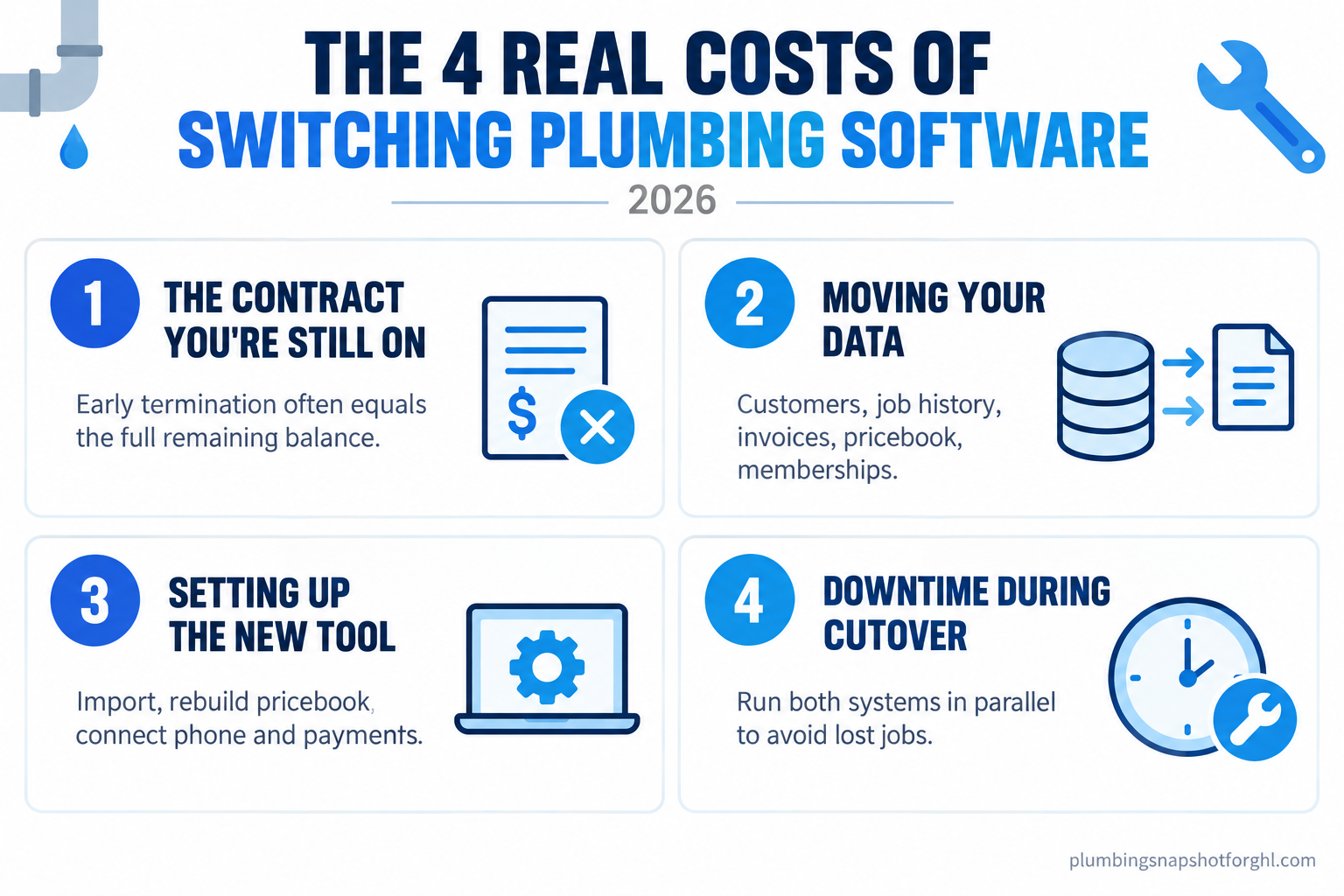
It’s the middle of freeze season, your busiest ten weeks, and the software you bought two years ago is fighting you again. The dispatch board is slow, you pay for a seat on every truck, and the bill went up at renewal. You decide you’re done and you’ll move to something cheaper. Then you open the contract: you’re locked in for another nine months, and leaving early means paying the whole balance. So you close the laptop and tell yourself you’ll deal with it later. Here’s the short version so you don’t stall: switching plumbing software has four real costs, the contract you’re still on, moving your customer and job data, setting up the new tool, and the downtime while you cut over. Get those four in the right order and you can leave a bad fit without paying a ransom, losing your history, or dropping a single job.
In this guide
- Why plumbers switch software in the first place
- The four real costs of switching
- Cost 1: the contract you’re still on
- Cost 2: getting your data out
- Cost 3: setting up the new tool
- Cost 4: downtime during the cutover
- What switching costs a solo, a 3-truck, and an 8-truck shop
- The steal-this migration playbook
- The compliance steps nobody warns you about
- Objections, answered straight
- Frequently asked questions
Why plumbers switch software in the first place
Nobody rips out their field service software for fun. Most owners put it off a year longer than they should, and when they finally move it’s for one reason: the tool costs more than it returns.
The most common trigger is the per-technician bill. Platforms like ServiceTitan charge per seat, so every plumber you hire raises your software cost, with third-party estimates putting ServiceTitan at roughly $245 to $500 per technician per month (contractor estimates via G2). Headcount is already your biggest cost. The median plumber earned $63,800 a year as of May 2025 (BLS), so a tool that bills you more with every hire fights the growth you’re funding.
The second trigger is paying for a platform you can’t fill. Enterprise software assumes dedicated dispatchers, CSRs, and a marketing manager, which in a 3-truck shop are three jobs one person does from the truck. ServiceTitan itself told the Better Business Bureau its platform is not optimized for a company with three or fewer technicians (BBB complaints). The third is simpler: the tool doesn’t answer the phone and capture the job before it goes to the next shop, the gap we cover in our after-hours AI receptionist playbook. Whatever the trigger, the real question is what it costs to leave, and that’s where shops get surprised.
The four real costs of switching
When a plumber budgets a switch, they budget one number: the monthly price of the new tool. That’s the cost that doesn’t hurt. The three that do are the ones nobody quotes you.
Sources: FieldCamp cancellation guide, ServiceTitan BBB complaints. ServiceTitan does not publish its subscription agreement.
Four line items: the contract you haven’t finished, getting your customer and job history out cleanly, standing up the new system and training the crew, and the downtime risk while you move between the two. Price all four first, because the order decides whether the switch costs a weekend or a five-figure fee.
Cost 1: the contract you’re still on
This is the big one, and it’s why most shops feel trapped. Published-price tools like Housecall Pro and Service Fusion bill month-to-month, so leaving costs nothing but 30 days’ notice. Enterprise platforms are different. ServiceTitan’s standard initial term is 12 months, it renews automatically, and the early termination fee isn’t a flat penalty, it’s the full remaining balance of your contract with no proration (FieldCamp cancellation guide).
That’s how the numbers get scary. In public complaints, contractors describe termination demands of $16,121 for seven remaining months, $32,160 in remaining payments, and $67,230 for the balance of a 24-month term (ServiceTitan BBB complaints). Real shops that wanted out, and the exit cost as much as staying.
Early-termination demands described by contractors in public BBB complaints. The exit fee equals the remaining contract balance, not a flat fee. Sources: ServiceTitan BBB complaints, FieldCamp cancellation guide.
How it breaks. Two avoidable mistakes cost the most. First, people cancel by phone or email the wrong person, when notice usually has to be in writing to your account executive (FieldCamp cancellation guide). Second, they miss the renewal window. These contracts renew automatically unless you give written notice, commonly 30 to 60 days before the renewal date. Miss it by a day and you’ve signed up for another full term.
So the first move isn’t shopping new tools. It’s finding your contract, reading the term and renewal date, and marking the notice deadline. Mid-term, timing the switch to the renewal window usually beats paying the balance to leave early. For what these contracts cost while you’re in them, our ServiceTitan pricing breakdown lays out the per-tech math.
Cost 2: getting your data out
Your software holds the most valuable thing your business owns: the full history of every customer, job, and price you charge. Leaving means getting all of it out in a form the next tool can read, and this is where plumbers lose sleep. It’s usually doable. The catch is timing.
ServiceTitan publishes an Open Data Pledge promising to enable export of customer data to CSV, which is what you want because every other tool imports it. But a pledge to export is not the same as a smooth export, and the files don’t all come out clean.
Pull these, and keep a local and a cloud copy:
- Customer records: names, addresses, phone numbers, emails
- Job history and invoices and payment history
- Your pricebook, every flat-rate task and code
- Technician records
- Membership and maintenance-plan data, especially renewal and expiry dates
How it breaks. Membership expiry dates, preferred-technician assignments, and pricebook task codes often migrate poorly and need exporting and checking separately (FieldCamp cancellation guide). Lose the expiry dates and you can’t bill your recurring plans, which is pure profit walking out the door. The bigger trap is timing: access can be restricted once a termination is in process. Export everything while the account is fully active and notice is not yet filed, confirm every file opens, then start the clock on leaving.
Cost 3: setting up the new tool
This cost is in your control. Setup is cheap on tools built for small shops and brutal on tools built for enterprises, and the point of leaving an oversized platform is to not sign up for another oversized setup.
Housecall Pro and Jobber are self-serve. You import your customer CSV, rebuild your pricebook, connect phone and payments, and you’re running in days, which matters because the person doing it is you or your one office admin. A full ServiceTitan-grade implementation, by contrast, is a project, with contractors reporting one-time fees from about $5,000 to $25,000 (contractor reports via G2). If you’re leaving a tool because setup and cost were painful, don’t walk into the same trap on the way out.
Starting monthly price (annual billing) of three tools that publish prices and offer month-to-month plans. Housecall Pro Basic and Jobber Core are one user ($29 each additional on Jobber); Service Fusion Starter is unlimited users. Sources: Housecall Pro, Jobber, Service Fusion via Capterra.
The right destination depends on your size and how you charge. Housecall Pro is simplest to run (pricing), Jobber is strong for quoting-heavy shops with add-ons priced separately (pricing), and Service Fusion charges a flat rate for unlimited users, so your twelfth truck costs the same as your second (pricing via Capterra). For the full side-by-side, see what plumbing software actually costs in 2026 and our per-tech vs unlimited-user pricing breakdown.
Cost 4: downtime during the cutover
The last cost has no invoice, and it’s the one that actually loses jobs. The cutover is the window where you move the shop from the old system to the new one, and doing it wrong means a double-booked tech, a missed dispatch, or a lost day of scheduling at the worst time.
The cost is a dropped or double-booked emergency job in your busy season, and the jobs flowing through your software during a freeze are the expensive ones. Water damage and freezing claims average about $15,400 per claim, and roughly one in 60 insured homes files a water-damage or freezing claim each year (Insurance Information Institute). Fumble the schedule and you’re handing a five-figure job to the next plumber on the map.
How it breaks. The classic mistake is the big-bang cutover: flipping everything overnight, mid-season, with no overlap. The fix is to run both systems in parallel for a week or two, keep the old one read-only as backup, and cut over during your slowest stretch. Nobody retrains a crew the same week the phone won’t stop ringing.
What switching costs a solo, a 3-truck, and an 8-truck shop
The four costs land differently depending on your size.
Solo operator. You’re usually switching off paper or a basic plan you’ve outgrown, so there’s rarely a contract to escape. Your real cost is a weekend of setup and a clean customer list. Land on Housecall Pro Basic or Jobber Core, import your contacts, and you’re running by Monday. The mistake is overbuying a platform you’ll never fill.
3-truck shop. This is the shop most likely to be stuck mid-contract on an enterprise tool it was sold too early. Your biggest cost is the contract, so the game is timing the switch to your renewal window. The payoff is dropping a four-figure per-seat bill to a couple hundred dollars a month.
8-truck shop. You might use enough of a bigger platform that the decision is closer, and your costs are real on all four fronts. If you switch, weigh a flat-rate unlimited-user tool like Service Fusion against per-seat pricing, because from roughly six to eight users on, the flat rate usually wins. Run the parallel period longer and put one person in charge.
The steal-this migration playbook
Here’s the whole switch as a sequence you can run without a consultant. Do it in this order and nothing gets lost.
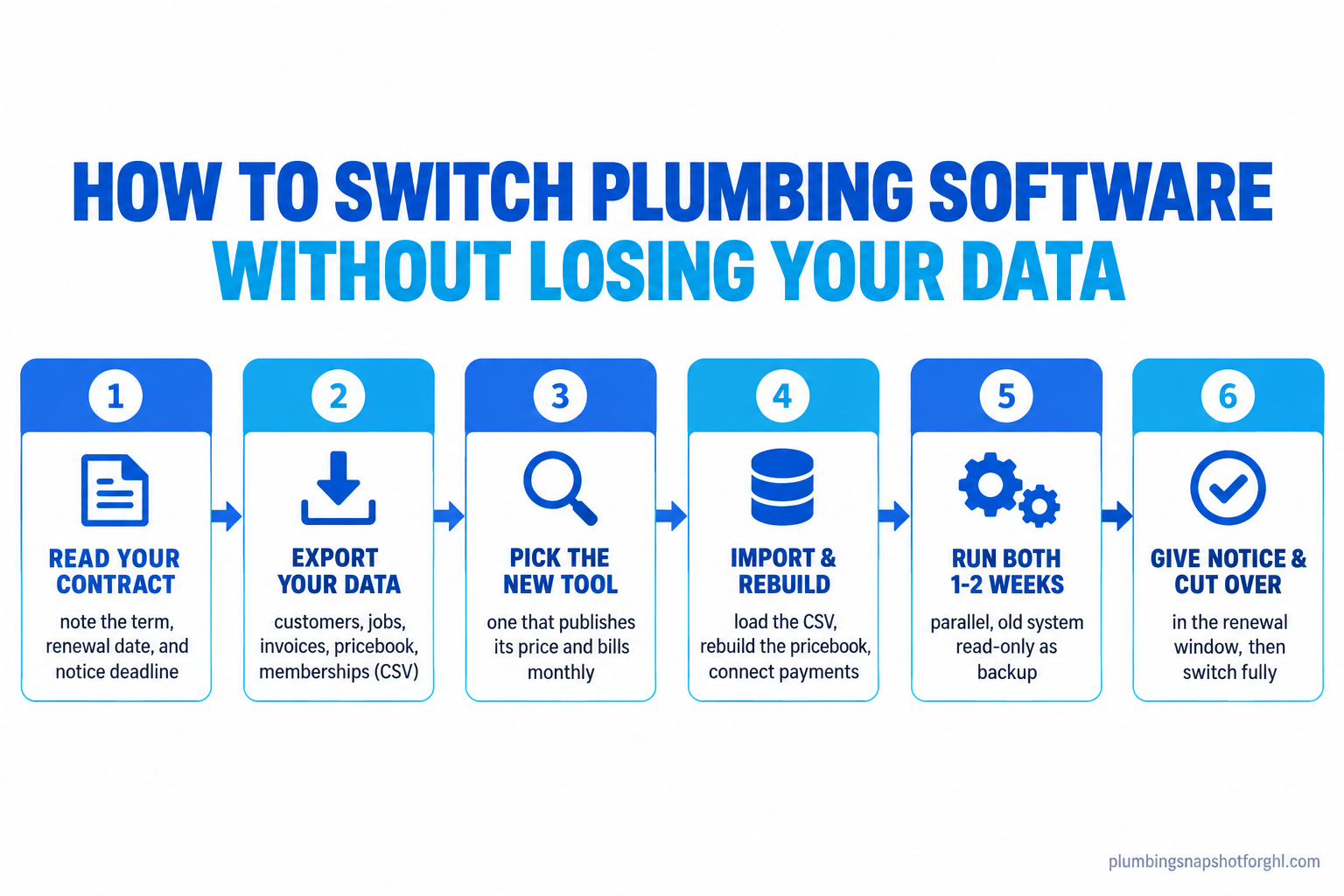
One more piece of copy worth stealing: the message to any customer with an appointment during the cutover. Send this and the switch stays invisible to them.
Hi [Name], quick heads up from [Shop]. We’ve upgraded our scheduling system to serve you faster. Your [day/time] appointment is still confirmed, nothing changes on your end. Reply here anytime with questions. Thanks for trusting us with your plumbing.
Short and calm, and it heads off the “did my appointment survive” call.
The compliance steps nobody warns you about
Two compliance items ride along with a software switch, and both bite plumbers who don’t plan ahead.
Your texting registration resets. If your new tool uses a different number or messaging platform, you’re registering a new A2P 10DLC campaign. As of June 30, 2026, a new campaign requires a valid, publicly accessible privacy policy URL and a terms and conditions URL, and campaigns without them get rejected (Twilio changelog). Publish both on your website before you move your texting. Our TCPA guide for plumbers covers the consent language that goes with it.
Your license number travels with every ad. If your switch involves a new website or new ad numbers, in California the contractor license number must appear in all advertising, and C-36 plumbing contractors must display their name, address, and license number in letters at least 1.5 inches high on both sides of every commercial vehicle, with civil penalties from $100 to $5,000 (CSLB advertising guidelines). Nevada has a similar rule. Confirm your new site carries the number. More in our 2026 plumbing marketing compliance guide.
Objections, answered straight
“I’m locked into a 12-month contract, so I’m stuck for a year anyway.” Not stuck, just timed. The expensive mistake is paying the full remaining balance to leave early. The smart play is to use the months you’ve already paid for: export your data now, pick and test the new tool during the term, and give written notice inside the renewal window so you leave at zero exit cost. Spend the lock-in preparing instead of fuming.
“Isn’t cheaper software just worse software?” Not here. Housecall Pro and Jobber were built for small shops on purpose and they’re excellent at it. The hidden-price enterprise tools aren’t better for a 3-truck shop, they’re built for a 30-truck one and priced for it. Matching the tool to your size is the upgrade, not the downgrade. See our ServiceTitan alternatives breakdown.
“Do I need to be technical to migrate?” No. On a small-shop tool the whole thing is export a CSV, import a CSV, rebuild your pricebook, and connect phone and payments. If you can run a smartphone and a spreadsheet, you can run the checklist above. The only part worth outsourcing is a large, messy pricebook.
Frequently asked questions
How much does it cost to switch plumbing software in 2026?
The new tool is cheap (Housecall Pro from $59/mo, Jobber from $49/mo, Service Fusion from $208/mo for unlimited users). The costs that hurt are the contract exit, data migration, setup, and cutover downtime. On a month-to-month tool it's a weekend of setup. Mid-contract on ServiceTitan, leaving early can cost the full remaining balance, which contractors describe in public complaints as $16,000 to $67,000.
Can I cancel ServiceTitan early without paying the full contract?
Usually not. The standard term is 12 months with automatic renewal, and the early termination fee is typically the full remaining contract value with no proration. The cheapest exit is written notice to your account executive inside the renewal window, commonly 30 to 60 days before renewal. ServiceTitan does not publish its subscription agreement, so read your own order form for exact terms.
Will I lose my customer and job data if I switch?
Not if you export before you give notice. ServiceTitan's Open Data Pledge promises CSV export, and CSV imports into every other tool. Pull customer records, job history, invoices, pricebook and task codes, technician records, and membership data with expiry dates. Check memberships, preferred-tech assignments, and pricebook codes separately, since those often migrate poorly. Access can be restricted once a termination starts, so do it while the account is active.
How long does a plumbing software migration take?
On a small-shop tool, setup is days: import your CSV, rebuild the pricebook, connect phone and payments. Budget 1 to 2 weeks running both systems in parallel to catch anything that didn't transfer. Do the move in your slow season, not a freeze-season surge.
Do I need to re-do my SMS compliance when I switch tools?
Often yes. A new number or messaging platform means a new A2P 10DLC campaign. As of June 30, 2026, a new campaign requires a publicly accessible privacy policy URL and a terms URL, or it gets rejected. Publish both before you move your texting, and keep your TCPA consent language intact.
The bottom line
Back on that freeze-season afternoon, open the laptop again, but don’t shop for a new tool first. Find your contract, read the term and renewal date, and mark the notice deadline. Then export your data while the account still works, pick a tool that publishes its price and bills monthly, run both systems in parallel for a week or two, and cut over in your slow season. Done in that order, switching stops being a trap: you drop a bill that punished you for growing, without losing a customer, a pricebook, or a single job. And whatever back-office tool you land on, none of them answers the 2am burst-pipe call by default, so price the dispatch software for the job it does and handle call capture separately.
About the author
Hector Salinas is the GHL Automation Lead at Plumbing Snapshot for GHL, based in Phoenix, AZ. He spent nine years dispatching for a 12-truck plumbing operation before he ever touched a CRM, and he has lived through more than one painful software switch. He writes the way he’d brief a new service manager: plainly, with the revenue math and the fine print attached.