

You run three trucks. A buddy who runs thirty keeps telling you to “just get ServiceTitan.” So you open the pricing page, and there’s no price. Every tier says “Request a Demo.” You give up and keep limping along on a spreadsheet and a cell phone, feeling like you’re falling behind. Here’s what nobody says out loud: ServiceTitan isn’t the right tool for a shop your size, and the company more or less admits it. The real question is which alternative to pick. For almost every 1-to-15-truck residential shop, the answer is Housecall Pro, Jobber, or Service Fusion, all of which print their prices on a public page and start under $250 a month.
In this guide
- First, is ServiceTitan actually wrong for your shop?
- How to judge a ServiceTitan alternative
- The best ServiceTitan alternatives, ranked for a small shop
- The alternatives at a glance
- What each one costs as you add techs
- Which fits: solo, 3-truck, and 8-truck shops
- Steal this: the switch checklist and the questions that force a straight quote
- Don’t let compliance break when you switch
- Objections, answered straight
- Frequently asked questions
- About the author
First, is ServiceTitan actually wrong for your shop?
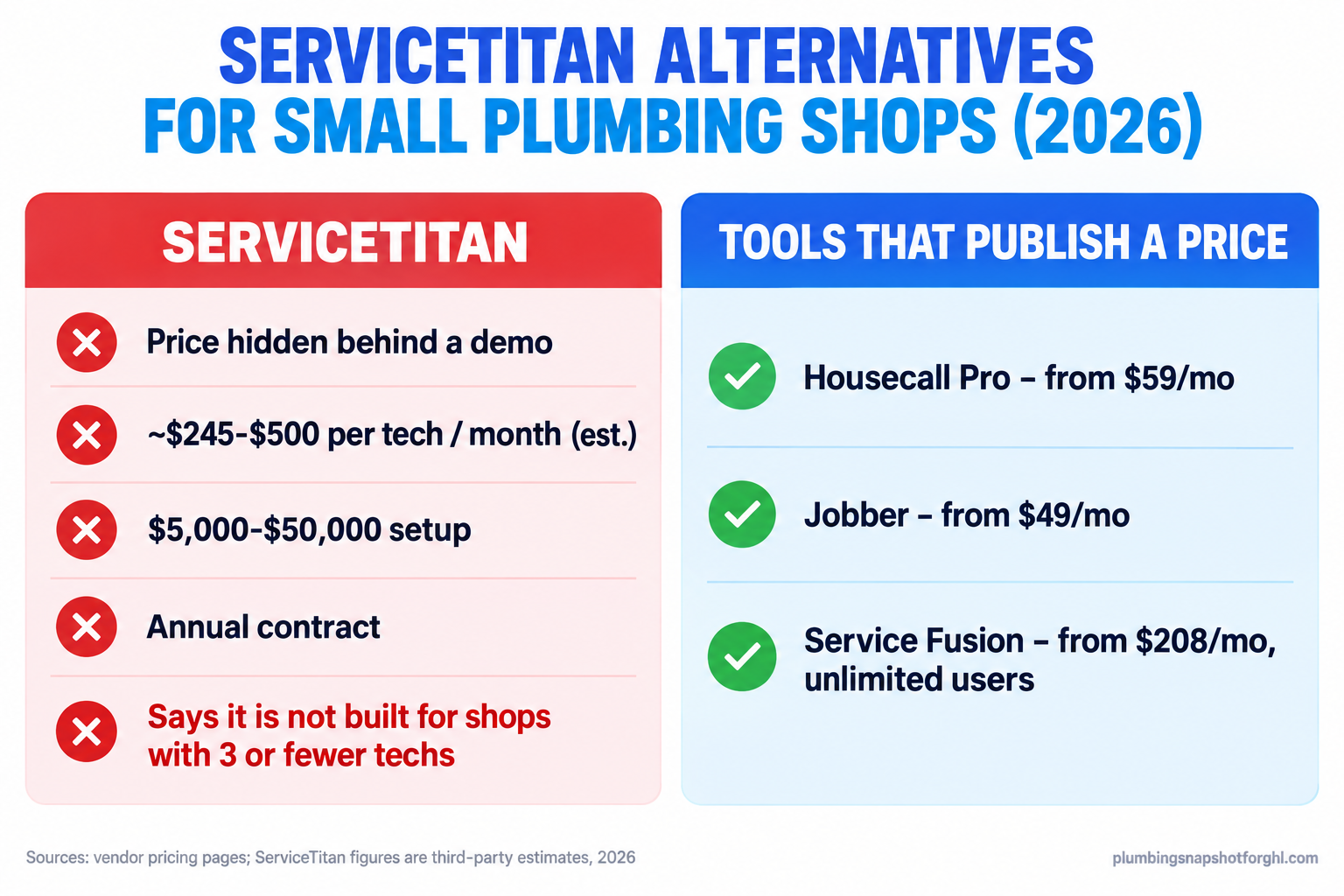
ServiceTitan doesn’t publish a price. Third-party estimates from contractor review sites put it at roughly $245 to $500 per technician per month, on an annual contract, plus a one-time setup fee reported between $5,000 and $50,000 (ServiceTitan pricing, third-party estimates). That’s per seat, so the bill climbs with every hire. For a three-truck shop, you’re into four figures a month before you book a single job. And the real deal-killer isn’t the number.
It’s this: ServiceTitan told the Better Business Bureau its platform is “not optimized for a company with three or fewer technicians” (BBB complaints). The vendor already answered your question. If you run a handful of trucks, you’d be paying enterprise prices to fight an enterprise tool built for someone else. We run the full math in our ServiceTitan pricing teardown; the short version is to buy a tool that fits.
Keep those last two numbers in mind while you shop. The median plumber earns $63,800 a year, or $30.67 an hour (U.S. Bureau of Labor Statistics), so a tech’s time is your most expensive input, and software that wastes it costs more than its sticker. The average water or freezing homeowners claim ran $15,400 from 2019 to 2023 (Insurance Information Institute), the size of the emergency job a clunky system lets slip to the next shop. Your software exists to capture those jobs and bill them fast.
How to judge a ServiceTitan alternative
Any tool demos well. These eight things decide the bill and the fit.
- Does it publish a price? A vendor that prints its number respects your budget. One that hides it is sizing you up first.
- Per seat or flat rate? Per-seat pricing punishes hiring; flat, unlimited pricing rewards it. The two cross over around six techs (per-tech vs unlimited breakdown).
- How many users are included? “From $149” means nothing until you know if that’s one tech or five.
- What do add-ons cost? Phone, marketing, review requests, and extra seats are where the quote doubles.
- What’s the migration cost? Ask about import help and export fees before you sign, not after.
- Is there a contract? Month-to-month beats an annual lock-in when you’re not sure a tool fits.
- What are the card rates? Most tools take about 2.6% to 2.9% plus $0.30 per transaction. On a $15,400 job, that adds up.
- Does it capture the after-hours call? Almost every field-service tool fails here, and it’s the one that loses the repipe.
The best ServiceTitan alternatives, ranked for a small shop
1. Housecall Pro: the default for a 1-to-8 truck shop
Housecall Pro is what most small residential plumbers should look at first. It publishes three plans: Basic at $79/mo (1 user), Essentials at $189/mo (up to 5 users), and Max at $329/mo (up to 8 users), with extra seats at $35/mo. Billed annually those drop to about $59, $149, and $299 (Housecall Pro pricing). The mobile app is built for a tech in a crawlspace, not a dispatcher at a desk.
Who it’s for: solo operators up through an eight-truck shop that wants scheduling, invoicing, booking, and payments in one app without per-seat math.
The honest downside: the add-ons that matter, its Voice phone tool and CSR AI call handling, are listed without a price. Ask, and price them separately before you assume they’re free.
2. Jobber: the most transparent pricing in the category
Jobber prints everything, which is a relief after ServiceTitan. Plans run Core $49/mo (1 user), Connect $199/mo (5 users), Grow $299/mo (5 users), and Plus $499/mo (5 users), extra seats $29/mo. It lists every add-on by name and price: Marketing Suite $99/mo, Pipeline $49/mo, AI Receptionist $29/mo (Jobber pricing). Its Client Hub, where homeowners approve quotes and pay online, is the best in this group.
Who it’s for: a quote-heavy shop (repipes, water-heater jobs) that lives on fast estimate follow-up.
The honest downside: at matched seat counts Jobber usually runs a bit higher than Housecall Pro, because the tools plumbers want most are add-ons that stack on the base plan. Full math in our Housecall Pro vs Jobber breakdown.
3. Service Fusion: flat rate, unlimited users, built to grow into
Service Fusion flips the model. Instead of charging per seat, it bundles unlimited users into every plan: Starter $245/mo, Plus $382/mo, Pro $627/mo, month to month, or about 15% less billed annually ($208, $325, $533). No contract (Service Fusion pricing). Tech twelve costs the same as tech two.
Who it’s for: a 6-to-15 truck shop, or any shop adding seats fast, that’s tired of the bill climbing on every hire.
The honest downside: the entry price is higher than Housecall Pro or Jobber, so for a solo or two-person shop it’s overkill. Flat rate only pays off once you can spread it across six to eight users.
4. FieldEdge: a caution, because it hides its price too
FieldEdge gets recommended as a ServiceTitan alternative constantly, and on features it’s a reasonable fit for residential service work. But it has the same flaw that sent you looking: no public price. You book a demo and get a per-user quote from a rep (FieldEdge pricing). If transparency is why you’re leaving ServiceTitan, FieldEdge puts you right back on the demo treadmill. We dug into the reported numbers in our FieldEdge pricing guide.
5. Workiz: a caution, because it pulled its numbers in 2026
Workiz used to be an easy pick for small trades. Then in 2026 it stopped publishing pricing, and the page now shows “Request pricing” on each plan, with its phone and answering tools as separate, unpriced add-ons (Workiz pricing). User reviews put the answering add-on near $200/mo, but the company doesn’t confirm it. When a vendor moves backward into secrecy, give its quote real skepticism. Full story in our Workiz pricing update.
What none of them do: answer the 2 AM call
Here’s the part the comparison charts miss. Every tool above runs a job once it exists: schedule, dispatch, invoice, collect. None reliably answers the emergency call that comes in after hours and turns it into a booked job. That’s a separate layer, call capture, instant text-back, and after-hours booking, and it’s the one that recovers the $15,400 burst-pipe job. Our after-hours answering breakdown walks through the options.
The alternatives at a glance
ServiceTitan alternatives for a small plumbing shop, 2026
| Plan | Housecall Pro recommended | Jobber | Service Fusion |
|---|---|---|---|
| Price | From $59/mo (annual Basic) | From $49/mo (Core) | From $208/mo (annual Starter) |
| Feature 1 | Publishes price: yes | Publishes price: yes, add-ons too | Publishes price: yes |
| Feature 2 | 1, then up to 5, then up to 8 users; +$35/seat | 1 to 5 users per plan; +$29/seat | Unlimited users on every plan |
| Feature 3 | Best mobile app for field techs | Best quote follow-up and client portal | No contract, month to month |
| Feature 4 | Add-ons (Voice, CSR AI): price on request | Add-ons: Marketing $99, Pipeline $49, AI Receptionist $29 | Flat rate wins past ~6 to 8 techs |
| Feature 5 | Best fit: 1 to 8 trucks | Best fit: quote-heavy 1 to 10 trucks | Best fit: 6 to 15 trucks and growing |
| See pricing | See pricing | See pricing |
What each one costs as you add techs
The headline price is a trap. Per-seat tools look cheap at the demo and get expensive the day you hire. Here’s what a three-truck shop pays each month.
3-truck shop, annual-billing rates. ServiceTitan is a third-party estimate (3 at ~$365). Sources: Housecall Pro, Jobber, Service Fusion, 2026.
Now run the same shop out to ten techs. Service Fusion Pro stays flat near $533 and Housecall Pro Max lands around $399, but ServiceTitan’s per-technician model climbs to a rough $3,650 a month (ten techs at ~$365). On a per-seat tool, every hire adds to the bill month after month. That’s the whole argument for flat-rate pricing.
The lesson isn’t “buy the cheapest.” Per-seat and flat-rate pricing cross over around six to eight techs, so the right answer depends on where your shop is headed, not just where it is today.
Which fits: solo, 3-truck, and 8-truck shops
The same framework gives three answers by size.
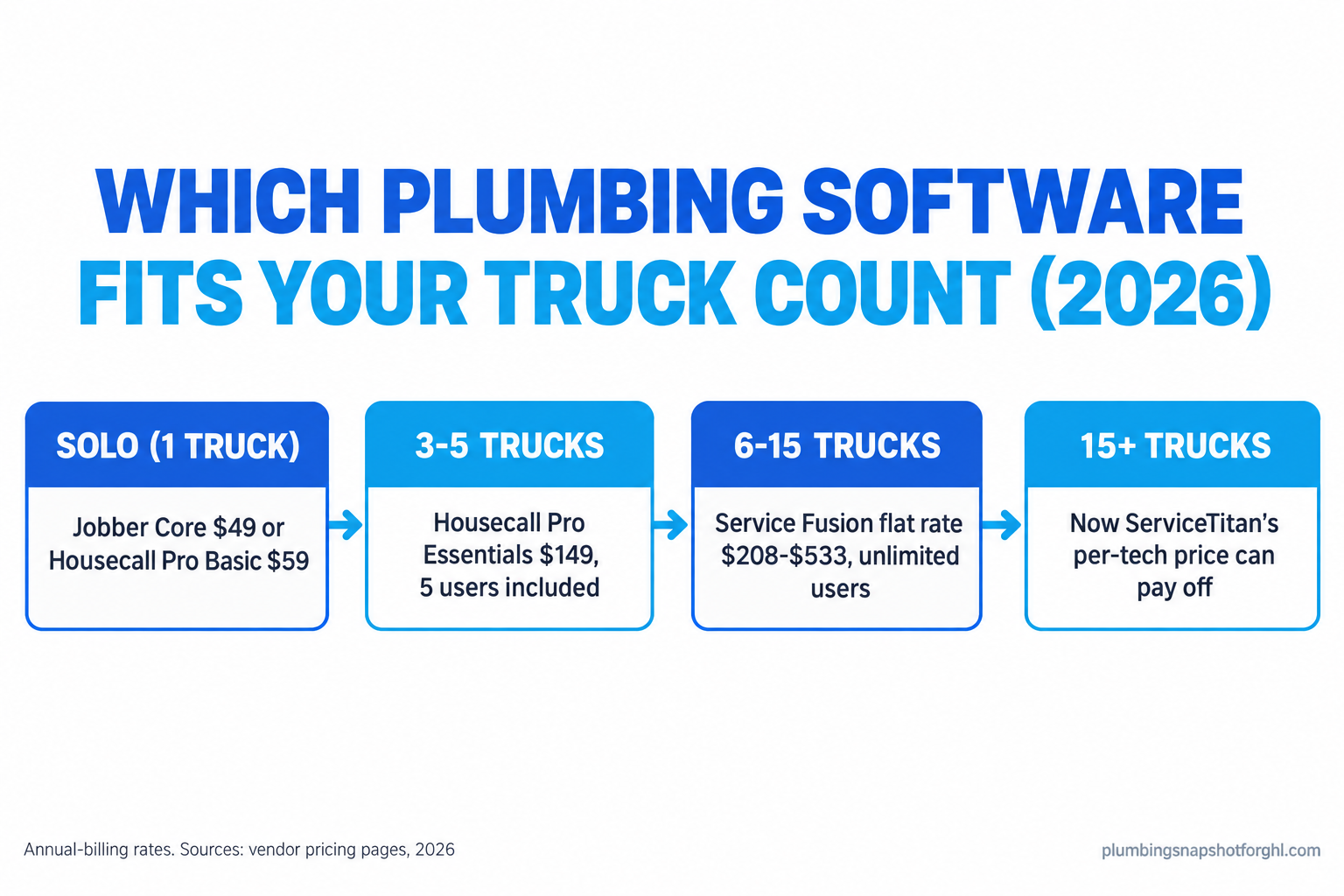
The solo operator (1 truck). You need scheduling, invoicing, booking, and payments, cheap. Jobber Core at $49/mo or Housecall Pro Basic at $59/mo (annual) are the two real picks. ServiceTitan plus a setup fee is absurd for a crew of one, and Service Fusion’s unlimited model pays for seats you don’t have.
The 3-truck shop. The sweet spot for Housecall Pro Essentials: $189/mo, or $149 annually, with all five seats included and no per-tech math. Jobber Grow covers the same five at $299/mo but adds the polished quote follow-up and client portal, so if your average job is a big quoted repipe, the extra spend can pay for itself in closed estimates.
The 8-truck shop. Housecall Pro Max includes eight users for $329/mo, hard to beat if its features cover your workflow. But you’re right at the line where Service Fusion’s flat, unlimited pricing starts to win, especially if you’ll run twelve trucks next year. Price both. And if you’re genuinely heading past fifteen trucks with a back office, a ServiceTitan call finally makes sense, because the per-tech price can pay off at that scale. Most residential shops never get there, and that’s fine.
Steal this: the switch checklist and the questions that force a straight quote
Switching is where good intentions die: half-migrated shops run two systems and lose customer history. Copy this into a note so the move sticks.
The 7-step switch checklist
- Export your full customer list (names, addresses, phone, email, job history) and confirm the file opens before you cancel anything.
- Rebuild your flat-rate price book in the new tool before go-live, not after. Shops skip this, and it’s why techs revert to guessing. Our flat-rate price book guide has the structure.
- Set up payments and run one real test transaction, including the card rate and deposit timing.
- Rebuild your appointment reminders and on-my-way texts, and send yourself a test of each.
- Port your business number or forwarding so no call drops during the switch.
- Train the crew on the mobile app with one real job each, on the clock, before launch day.
- Run both systems in parallel for two weeks, then cut the old one on a hard date.
The 6 questions that force a straight quote
Read these verbatim to the rep. A tool worth buying answers all six in writing, before you sign.
- “What’s the all-in monthly price for my exact tech count, with no annual-commitment discount?”
- “What does each extra user cost, and how many are included?”
- “What are the card and bank processing rates per transaction?”
- “Which features cost extra: phone, marketing, review requests, financing?”
- “Is there a contract, and what does it cost to export my data and leave?”
- “What’s the one-time implementation or onboarding fee?”
The text to send customers when you switch (adjust the name)
Hi [first name], it’s [Your Shop]. We’ve upgraded our scheduling and billing to serve you faster. You can book, approve quotes, and pay online here: [link]. Same team, same number, better service. Reply STOP to opt out.
Don’t let compliance break when you switch
When you move tools, your texting setup moves with you, and this is where shops quietly break the law. Two rules to carry across.
First, any automated texting (on-my-way alerts, reminders, review requests) needs documented consent under the TCPA, and your business texting has to be registered through A2P 10DLC or carriers will filter it. As of June 30, 2026, 10DLC registration also has to carry a working PrivacyPolicyUrl and TermsAndConditionsUrl, so those links have to exist on your site. That “Reply STOP” line above isn’t decoration; it’s part of staying compliant.
Second, if you run in California or Nevada, your contractor license number has to appear in every advertisement, and your new software’s booking pages and automated messages count. We lay it all out, with sample consent language, in our plumbing marketing compliance guide. Sort it during the switch, not after a carrier starts blocking your texts.
Objections, answered straight
“I already pay for ServiceTitan. Isn’t switching a waste?” The question isn’t the money you’ve already sunk, it’s the next twelve months. A tool that fits at $149 to $329 a month, with features your crew will use, pays back the switching effort fast. Sunk cost is not a strategy.
“Isn’t cheaper software just worse software?” Not here. Housecall Pro and Jobber were built for small shops on purpose, and they’re excellent at it. The hidden-price tools aren’t better for a three-truck shop, they’re built for a thirty-truck one and priced for that buyer.
“Do I need to be technical to switch?” No, but budget time, not just money. Every migration means moving your list, rebuilding your price book, and training the crew. That’s why the checklist above exists. Vendors with published onboarding fees usually help with the import.
“What about all my customer data?” Export it first, always, and confirm the file before you cancel anything. Ask every vendor what it costs to export and leave, in writing. A tool that makes your data hard to take with you is telling you something.
Frequently asked questions
What is the best ServiceTitan alternative for a small plumbing shop?
For most 1-to-8 truck residential shops, Housecall Pro is the best fit: published prices from $59/mo annually, up to 5 or 8 users per plan, and the strongest field app. Jobber is best for quote-heavy shops, and Service Fusion is best for 6-plus trucks thanks to flat, unlimited-user pricing.
Why is ServiceTitan a bad fit for small plumbers?
It hides pricing behind a demo, charges roughly $245 to $500 per technician per month with a reported $5,000 to $50,000 setup fee, and locks you into an annual contract. It also told the BBB its platform is not optimized for companies with three or fewer technicians.
How much do ServiceTitan alternatives cost in 2026?
The tools that publish prices start well under ServiceTitan: Jobber Core $49/mo, Housecall Pro Basic $79/mo ($59 annually), and Service Fusion Starter $245/mo ($208 annually) with unlimited users. Add-ons for phone, marketing, and reviews can raise the real bill, so get every number in writing.
Is Housecall Pro or Jobber better for plumbers?
At matched seat counts Housecall Pro is usually cheaper with a stronger field app; Jobber wins on pricing transparency, quote follow-up, and customer self-service. A straightforward service shop tends to prefer Housecall Pro; a quote-heavy shop doing repipes often prefers Jobber.
When does ServiceTitan actually make sense?
Once you're running roughly 15 or more trucks with a real back office and the volume to use its depth, ServiceTitan's per-technician price can pay off. Below that, a published-price tool like Housecall Pro, Jobber, or Service Fusion delivers more value for far less.
What should I move before I switch plumbing software?
Export your customer list and job history, rebuild your flat-rate price book in the new tool, set up and test payments, re-create your reminder texts, port your phone number, and train the crew on the app. Run both systems in parallel for two weeks, then cut the old one on a hard date.
The bottom line
Back to those three trucks and the pricing page with no price. You don’t need ServiceTitan, and its own words to the BBB tell you why. Solo shops start on Jobber Core or Housecall Pro Basic, three-to-five truck shops on Housecall Pro Essentials, six-to-fifteen truck shops on Service Fusion’s flat plans. Pick the one that matches your truck count, run the switch checklist, and spend your energy on what moves the money: making sure the phone never rings out to a competitor at 2 AM.
About the author
Yvonne Castellanos is Snapshot Strategist and Agency Partner Success lead at Plumbing Snapshot for GHL, based in Charlotte, NC. She has onboarded plumbing shops from solo owner-operators to regional outfits running recurring maintenance memberships, and she focuses on the boring money: software fit, review pipelines, and the retention automations that prove ROI in the first 30 days. She writes case-grounded playbooks for operators who want the numbers before the pitch.