
It’s a Tuesday night, you just signed the lease on truck number four, and you’re pricing software because your current setup is a spreadsheet and a group text. ServiceTitan wants a demo and charges per technician. Then you find Service Fusion, and the headline stops you cold: unlimited users, one flat price, no contract. It sounds like the answer to per-seat pricing that punishes you for hiring. Here’s the honest math: Service Fusion’s flat rate is a real deal once your headcount climbs, it crushes ServiceTitan’s per-technician model at every size, and for a solo or small shop it sells you seats you don’t have yet.
What’s in this teardown
- What Service Fusion actually is
- The real 2026 price list
- What you get on Starter vs Plus vs Pro
- The unlimited-user math: when flat-rate wins
- Three shops, three answers
- The hidden costs nobody quotes you
- Where Service Fusion falls short for a plumber
- Service Fusion vs the alternatives
- Steal this: the demo questions and migration checklist
- Objections, answered straight
- FAQ
What Service Fusion actually is
Service Fusion is field service management software: scheduling, dispatch, estimates, invoicing, customer records, and payments in one system with a tech app for the field. It sits in the same category as ServiceTitan, FieldEdge, Housecall Pro, and Jobber. What sets it apart is the pricing model. Almost every competitor charges per user or per technician; Service Fusion charges a flat rate per plan with as many users as you want.
That one choice is why a growing shop looks at it: hire tech number six and your bill doesn’t move. But “unlimited users” is a feature, not a discount. With the median plumber earning $63,800 a year (BLS), the real test of any tool is whether it saves your crew’s time. Whether the price saves money depends on how many people touch the system, which is the math this breakdown does for your truck count.
The real 2026 price list
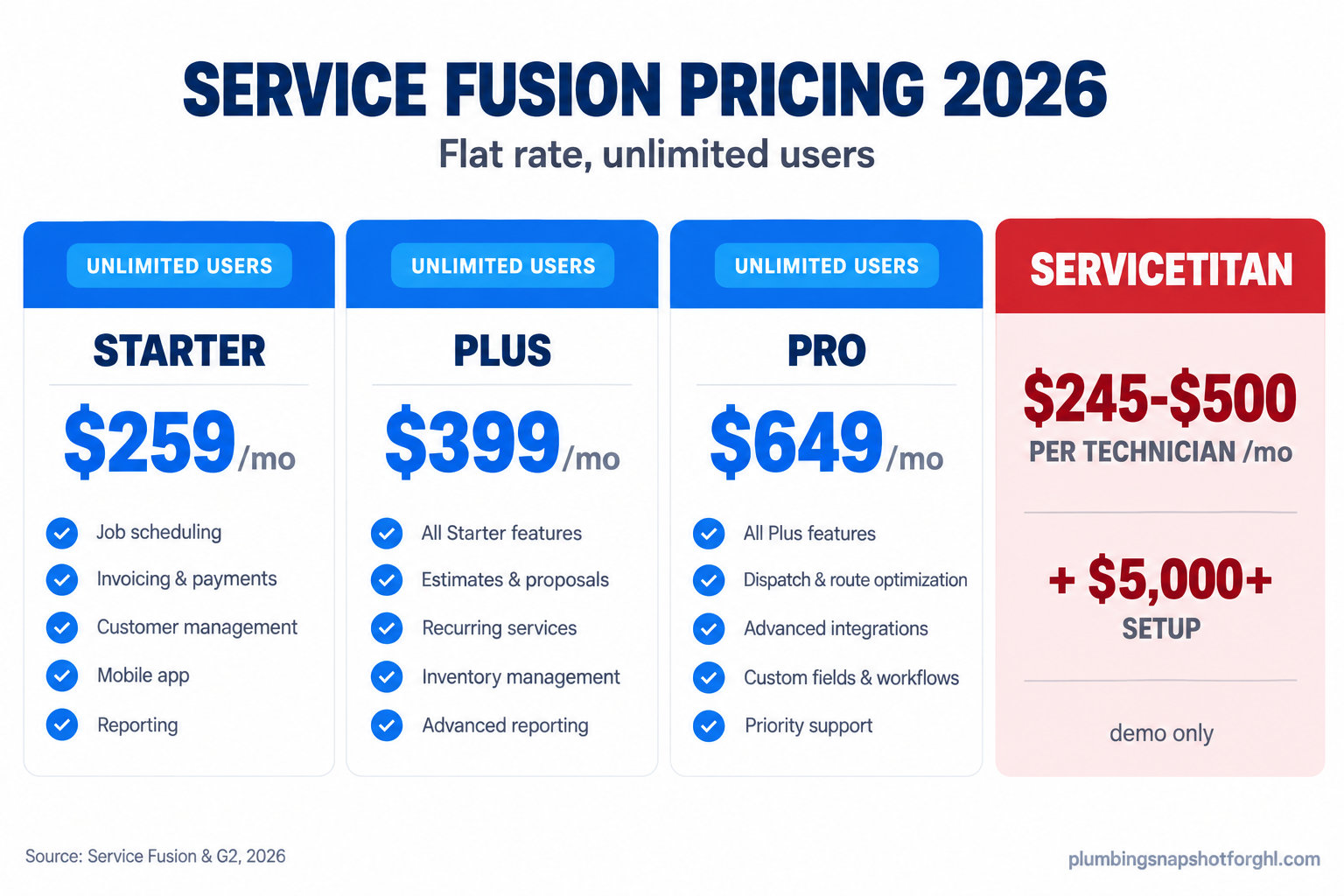
Service Fusion publishes its prices, which already puts it ahead of ServiceTitan, FieldEdge, and Workiz. Here’s the pricing page in November 2026.
| Plan | Monthly (month-to-month) | Billed annually (per month) | Users | Contract |
|---|---|---|---|---|
| Starter | $259/mo | $220/mo | Unlimited | Month-to-month |
| Plus | $399/mo | $339/mo | Unlimited | Month-to-month |
| Pro | $649/mo | $552/mo | Unlimited | Month-to-month |
Source: Service Fusion pricing. Annual billing is one upfront payment and saves about 15%. There is no free trial; you book a demo.
One caution: these rates move. The annual prices jumped in mid-November 2026 (from $208/$325/$533 to $220/$339/$552), and directories still list stale figures. Confirm the live number on servicefusion.com before you sign.
Compare that to how the rest of the category charges:
| Software | Starting price | How it charges | Users included |
|---|---|---|---|
| Service Fusion | $220/mo (annual Starter) | Flat, per plan | Unlimited |
| Housecall Pro | $59/mo (annual Basic) | Per plan | 1, then 5, then 8, +$35/user |
| Jobber | $49/mo (Core, 1 user) | Per plan + per user | 1 to 15, +$29/user |
| ServiceTitan | ~$245–$500/tech (est.) | Per technician | Per seat |
Sources: Service Fusion, Housecall Pro, Jobber, ServiceTitan estimates via G2.
What you get on Starter vs Plus vs Pro
Price the tier that does the job, not the sticker.
Starter ($259/mo, $220 annual) covers the core: scheduling, dispatch, estimates, invoicing, customer records, and payments, with unlimited users. What it leaves out matters for a plumber: no job photos, no inventory, no job costing. If your techs document every water heater with before-and-after photos (they should, it closes repipes) or you track parts on the truck, Starter is already too thin.
Plus ($399/mo, $339 annual) adds those three. For most residential shops running real estimates and parts, Plus is the honest starting tier. Treat $339 to $399 as your real entry number, not $220.
Pro ($649/mo, $552 annual) adds an open API, custom documents, eSignature, a customer web portal, and recurring invoicing. The portal and recurring invoicing matter for maintenance memberships; the API matters for connecting other tools. If you don’t use those, you’re paying $250/mo for idle features.
Two things sit outside every tier as paid add-ons: GPS fleet tracking and ServiceCall.ai, the VoIP phone product. Neither has a published price, so if either is part of your plan, those are line items you have to pry a number out of a rep for.
The unlimited-user math: when flat-rate wins
“Unlimited users” is only a saving if you’d otherwise pay for a lot of users. So price a real 3-truck shop: three techs, the owner, one office person. Five users, standard list pricing.
Monthly cost for a 5-user shop (3 techs, owner, office), standard list pricing. ServiceTitan is a third-party estimate at ~$300/user and excludes its $5,000+ implementation fee.
At five users, Service Fusion is middle of the pack. Housecall Pro Essentials is cheaper and already includes five users, so the unlimited model buys you nothing here. For a shop this size, the flat rate is a wash at best.
Now add trucks. Picture twelve users: eight techs, two office staff, an apprentice, and a part-time sub who needs a login. On a per-seat platform you pay for all twelve. On Service Fusion you pay for the plan.
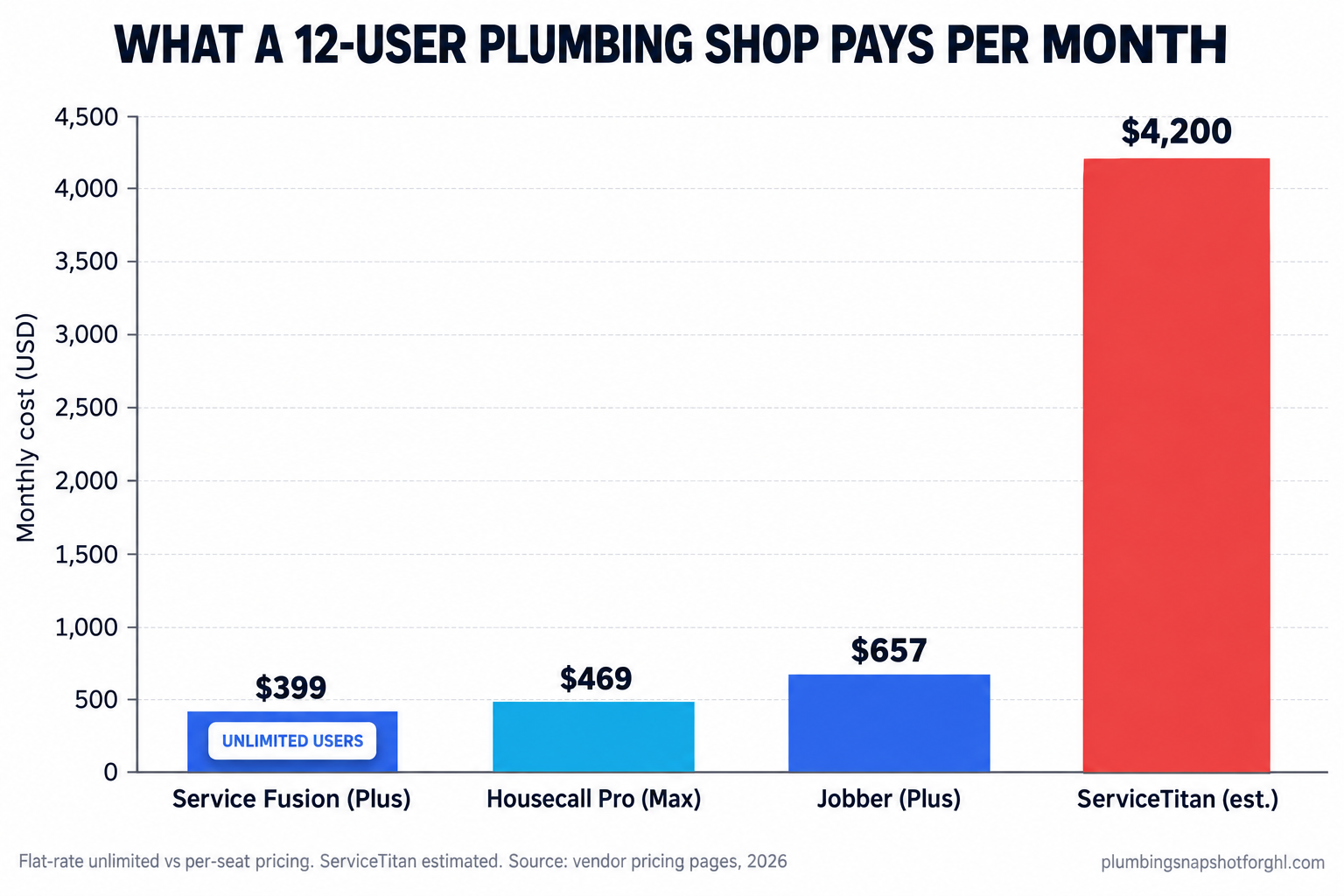
Monthly cost for a 12-user shop. Housecall Pro Max = $329 + $35 × 4 over the included 8. Jobber Plus 10-user tier ($599) + 2 × $29. ServiceTitan est. ~$350/user × 12, excludes implementation.
At twelve users the picture flips. Service Fusion Plus at $399 flat is the cheapest of the small-business tools, because the others stack $29 to $35 per head. Against ServiceTitan it’s no contest: an estimated $4,000+ a month versus $399. The flat rate stops the per-seat bleed exactly when it starts to hurt.
The takeaway: the break-even against Housecall Pro and Jobber lands around 8 to 12 users. Below that, you’re overpaying for unlimited; above it, unlimited is a real and growing discount. Our per-tech vs unlimited-user pricing breakdown walks the general version before you commit to either model.
Three shops, three answers
The right call depends on your size. Here it is for the three shapes most shops run.
Solo operator / one truck. Skip it. You’d pay $259 a month for unlimited seats you’ll never fill. Jobber Core ($49) or Housecall Pro Basic ($79) do the scheduling, invoicing, and online booking a solo plumber needs for a quarter of the price.
3-truck shop (about 5 users). A toss-up on price, so decide on fit, not the unlimited gimmick. Housecall Pro Essentials is a bit cheaper and easy to learn; Service Fusion is competitive if you like its dispatch board and want room to grow. Planning to be at 8 trucks in two years? Starting on the flat-rate platform saves a painful migration later. Steady at three? The cheaper small-shop tool wins.
8 to 15 trucks (12+ users). Service Fusion’s home turf. Once a dozen people log in, the flat rate beats per-seat Housecall Pro or Jobber and buries ServiceTitan. If the choice is ServiceTitan’s per-technician bill plus a five-figure implementation versus $399 to $649 flat, the math makes the case. The real question is whether it does everything you need, which is next.
The hidden costs nobody quotes you
The subscription is the number on the page. These decide what you actually pay.
- The two unpriced add-ons. GPS fleet tracking and the ServiceCall.ai phone product both cost extra, with no published price. If you want either, your real cost is the plan plus two numbers you extract from a rep.
- Payment processing. Integrated payments are included, but the rate is where the money moves. At the field-service average of 2.6% to 2.9% plus $0.30 per transaction, $1M a year in card volume costs $26,000 to $29,000 in fees. A half-point difference is $5,000 a year. Ask the exact rate.
- Annual billing is one upfront charge. The 15% discount is a single payment at signup, not twelve smaller ones. On Pro that’s about $6,600 on day one.
- Implementation time, if not a fee. No advertised five-figure setup fee, but every migration costs weeks: moving your list, rebuilding your price book, training the crew. Our guide to switching plumbing software covers leaving without losing your data.
- The no-trial wall. No free trial, only a demo, so go in with the questions below.
Where Service Fusion falls short for a plumber
This is the part a pricing page never tells you, and it decides whether the software earns its keep. Service Fusion is a solid job-management platform. Here’s where it leaves money on the table for a residential shop.
It doesn’t answer your phone. Service Fusion manages jobs once they exist. It does not pick up the 2 AM burst-pipe call, text back the customer you missed under a sink, or catch the 9 PM website lead. For a residential shop, the call you miss is the job you lose, and the Insurance Information Institute pegs the average water-damage and freezing claim at $13,954, the ticket walking to a competitor every time the phone rings out. Our plumbing answering service breakdown compares the options.
Missed-call text-back isn’t built in. The highest-ROI automation for a service trade is an instant text to anyone whose call you didn’t answer. Service Fusion’s core plans don’t do it. Here’s why missed-call text-back pays for itself.
Review requests aren’t automatic. Getting the five-star Google review the day the job closes is how you win the map pack. Service Fusion isn’t built to fire that ask on its own, so it’s a gap you fill with another tool or a manual process your CSR forgets.
The Starter tier is deceptively thin. No job photos, inventory, or job costing until Plus. For a plumber, photos close jobs and job costing tells you if you made money. Price Plus.
None of this makes Service Fusion bad software. It’s a job-management system, and the revenue leaks for a residential shop happen before the job exists (the missed call) and after it closes (the review you never asked for). Those need a layer Service Fusion doesn’t provide.
Service Fusion vs the alternatives
Quick read on who each tool actually fits:
- Service Fusion: the growing shop (8+ users) that wants flat, predictable pricing and room to add trucks. Strongest once headcount is real; weakest for a solo or two-person shop.
- Housecall Pro: the 1-to-8-user residential shop that wants the easiest learning curve and strong built-in financing and review tools. See the Housecall Pro vs Jobber breakdown.
- Jobber: the solo-to-small shop that wants the lowest entry price. Watch the add-ons (Marketing Suite $99, AI Receptionist $99, Pipeline $49), which stack fast.
- ServiceTitan: the 20-truck-plus operation with a back office. For a small shop it’s overbuilt and overpriced; see our ServiceTitan alternatives guide and ServiceTitan pricing breakdown.
For the full six-vendor picture with every fee, see what plumbing software actually costs in 2026.
Steal this: the demo questions and migration checklist
With no free trial, the demo is your only look before you buy. Walk in with these.
The nine questions to ask on the Service Fusion demo:
- “What’s the exact price on the plan I need, billed monthly and annually, in writing?”
- “Which tier includes job photos, inventory, and job costing?” (If they say Plus, price Plus.)
- “What does GPS fleet tracking cost per vehicle, and is it in the base plan?”
- “What does ServiceCall.ai cost, and what does it do for after-hours calls?”
- “Who processes payments, and what’s my per-transaction rate?”
- “Is the annual discount one upfront charge or twelve payments?”
- “What does onboarding include, how long does it take, and is there a setup fee?”
- “How do I export all my data if I leave, and is there a fee?”
- “Does it send missed-call texts and review requests automatically, or do I need another tool?”
The migration checklist, before you switch anything:
- Export your full customer list (names, addresses, phone, email, history) and confirm it imports cleanly.
- Rebuild your flat-rate price book before go-live, not after. Here’s how to build a price book your techs will follow.
- Pick a slow week. Never migrate during freeze season or your summer surge.
- Run both systems in parallel for two weeks. Don’t cancel the old one until the new one has booked real jobs.
- Train on the tech app first. If your crew won’t use the app, the office data is garbage by Friday.
- Line up your call-capture plan separately, because the job-management tool won’t answer the phone.
Objections, answered straight
“Unlimited users has to be cheaper, right?” Only if you have the users. At five people you’ll usually pay less on Housecall Pro or Jobber. The flat rate becomes a real discount around 8 to 12 users and grows from there. Count everyone who needs a login (office, apprentices, subs), then do the math at your real headcount.
“Is Service Fusion cheaper than ServiceTitan?” By a wide margin. ServiceTitan’s per-technician model plus a five-figure implementation puts a 12-user shop around $4,000 a month before setup; Service Fusion is $399 to $649 flat. ServiceTitan buys enterprise depth a small shop rarely uses. Under 20 trucks, the gap is hard to justify.
“Can Service Fusion replace everything I use?” No. It replaces scheduling, dispatch, invoicing, and customer records, not your call answering, missed-call text-back, or review engine. Plan to run a job-management platform and a call-capture layer, because they do different jobs. Making one tool do both is how calls slip through.
“Do I need to be technical to run it?” No, but budget time, not just money. Every migration means moving your list, rebuilding your price book, and getting the crew onto the app, the same on any platform. The demo and checklist above are how you avoid surprises.
Frequently asked questions
How much does Service Fusion cost in 2026?
Three plans, all with unlimited users: Starter $259/month ($220 annual), Plus $399/month ($339 annual), and Pro $649/month ($552 annual). Billing is month-to-month with no contract; annual billing is one upfront payment that saves about 15%. There's no free trial, only a demo.
Does Service Fusion really include unlimited users?
Yes, every tier includes unlimited users at no per-seat charge. The catch: unlimited only saves money when you have a lot of users. For a solo or two-person shop, Starter at $259 costs more than Jobber Core ($49) or Housecall Pro Basic ($79) for seats you won't fill.
Is Service Fusion cheaper than Housecall Pro or Jobber?
It depends on headcount. At about five users, Housecall Pro Essentials ($189/mo, includes 5 users) is cheaper. The break-even is roughly 8 to 12 users; above that, Service Fusion's flat rate beats the per-seat charges Housecall Pro ($35/user over 8) and Jobber ($29/user) add. Count every login.
What's the difference between Service Fusion Starter, Plus, and Pro?
Starter covers scheduling, dispatch, estimates, invoicing, and payments. Plus adds job photos, inventory, and job costing, which most plumbing shops need, so treat Plus as the real entry tier. Pro adds an open API, custom documents, eSignature, a customer web portal, and recurring invoicing.
Does Service Fusion answer after-hours calls or send missed-call texts?
Not on its own. It manages jobs once they exist; it doesn't answer the phone, text back missed callers, or request reviews automatically. For a residential shop, where a missed call is a lost job, you'll need a call-capture and automation layer alongside the job-management platform.
Does Service Fusion have hidden fees?
Plan prices are published, but GPS fleet tracking and the ServiceCall.ai phone add-on cost extra with no listed price, so ask. Payment processing fees (roughly 2.6% to 2.9% + $0.30 per transaction) are the other real cost. There's no advertised setup fee, but migration costs weeks of time either way.
The bottom line
Back to Tuesday night with the lease on truck four signed. Service Fusion’s “unlimited users” is not a trick, but it’s not an automatic deal either. If your login count is heading past a dozen, the flat rate is a genuine, growing discount and it buries ServiceTitan on price. If you’re a solo plumber or a steady three-truck shop, you’ll usually pay less on Housecall Pro or Jobber, and you should. Buy unlimited seats when you have seats to fill. Then handle the thing no job-management tool does: make sure the phone never rings out to a competitor at 2 AM, because that missed call is worth more than a year of any subscription on this list.
About the author
Yvonne Castellanos runs partner success at Plumbing Snapshot for GHL, based in Charlotte, NC. She has onboarded plumbing shops from solo owner-operators to regional outfits running recurring maintenance memberships, and she focuses on the boring money: the pricing math, the ROI, and the retention automations that keep a shop booked between emergencies. She writes the way she briefs an owner proving out a new system, plainly, with the numbers attached.