

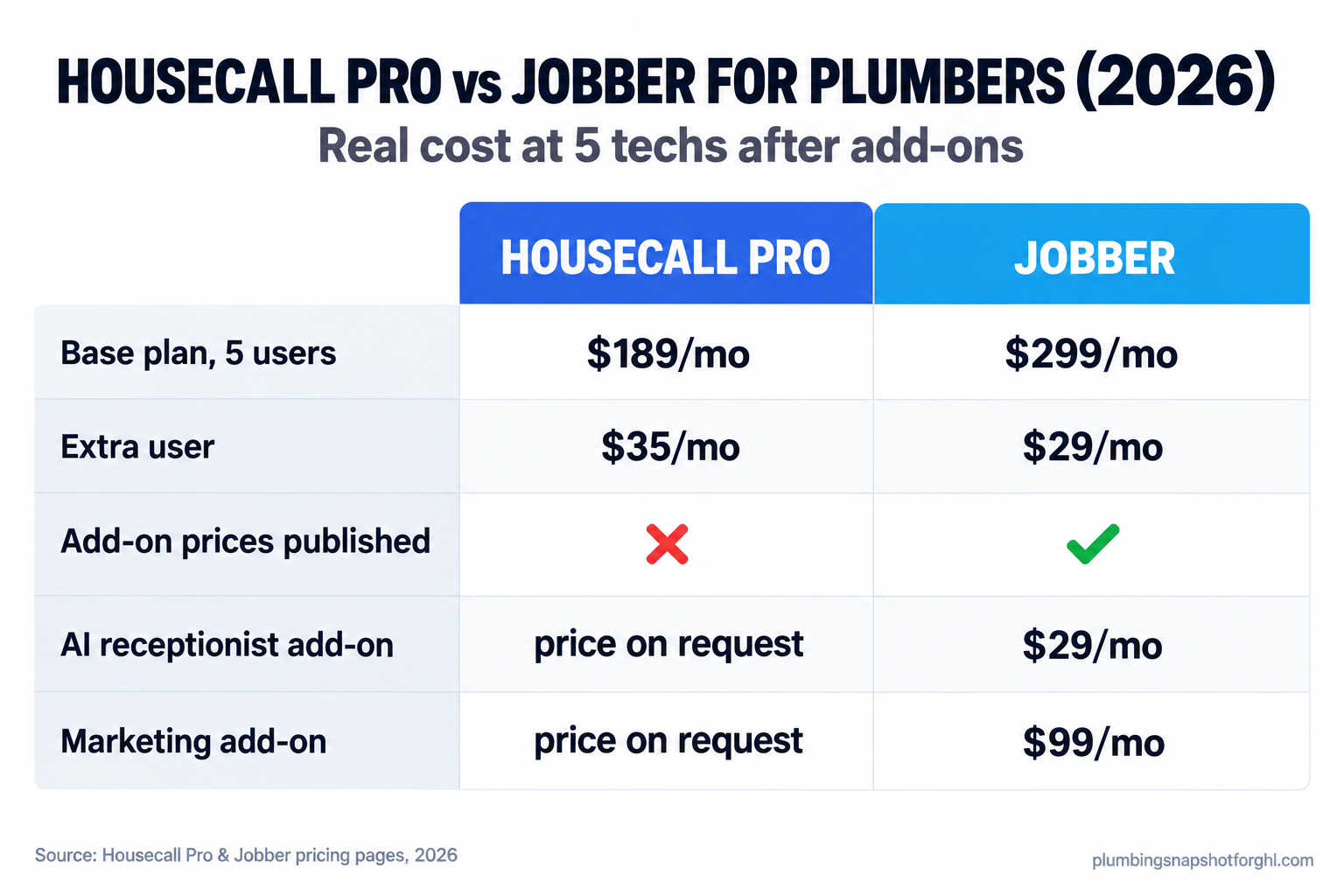
Housecall Pro and Jobber both do the thing ServiceTitan and Workiz won’t: they print a price on the page. At 5 techs, Housecall Pro’s Essentials plan lists at $189 a month ($149 billed annually) and includes all 5 seats, while Jobber’s comparable Grow plan for 5 users lists at $299 (Housecall Pro, Jobber). But the sticker is not the bill. Jobber publishes every add-on price; Housecall Pro lists its add-ons, Voice, Campaigns, CSR AI, with no price next to them, so you have to ask. This is the full teardown: real cost at 5 techs, three shop sizes, feature by feature, and who each one is for.
In this guide
- Why this is the right comparison for a plumbing shop
- What a missed call costs while you decide
- Housecall Pro vs Jobber: the base prices
- The real cost at 5 techs after add-ons
- Feature by feature, where it matters to a plumber
- What each one costs at three shop sizes
- Where both tools leave a hole
- How a software switch actually goes wrong
- Staying legal when the software texts your customers
- Steal these: the email and texts that do the work
- Objections
- Frequently asked questions
Why this is the right comparison for a plumbing shop
If you run one to five trucks, Housecall Pro and Jobber are the two names you keep landing on, and there is a reason. ServiceTitan hides every price behind a demo and has said in writing it is not built for shops with three or fewer techs. Workiz pulled its published prices down in 2026. Housecall Pro and Jobber still show you a real number before a rep ever calls, so you can actually compare them. We covered the ones that hide the ball in the ServiceTitan pricing teardown and the Workiz price breakdown.
Both do the same job: scheduling, dispatch, invoicing, and getting paid from a phone in the truck. The differences look small on a feature grid and feel large on the invoice. So the question is not “which is better,” it is “which is better for a shop my size, once I add the pieces I use.” That is the number this guide builds.
What a missed call costs while you decide
The Bureau of Labor Statistics puts the plumbing median wage at $63,800 a year, or $30.67 an hour, as of May 2025, with 7% job growth projected through 2035 and about 42,000 openings a year (BLS Occupational Outlook Handbook). Demand is steady and labor is tight, so your margin rides on how few jobs you drop. A $50 difference in monthly price is noise next to one repipe you booked because the software texted the customer back in 30 seconds instead of sending them to voicemail.
Housecall Pro vs Jobber: the base prices
Here is what each company prints on its own pricing page in 2026. These are published list prices, not reviewer guesses.
Housecall Pro runs three tiers (Housecall Pro pricing):
- Basic: $79/mo monthly, $59/mo billed annually. One user.
- Essentials: $189/mo monthly, $149/mo billed annually. Five users included.
- Max: $329/mo monthly, $299/mo billed annually. Eight users included, then $35/mo per extra user.
Card processing runs “as low as 2.59%” with a 1% fee on bank payments, and payments are where these tools quietly make their money.
Jobber prices by plan and seat count, so the number moves with your team (Jobber pricing):
- Core: $49/mo, one user.
- Connect: $139/mo for 1 user, $199/mo for 5 users.
- Grow: $199/mo for 1 user, $299/mo for 5 users.
- Plus: $499/mo for 5 users.
- Extra seats are $29/mo each across plans.
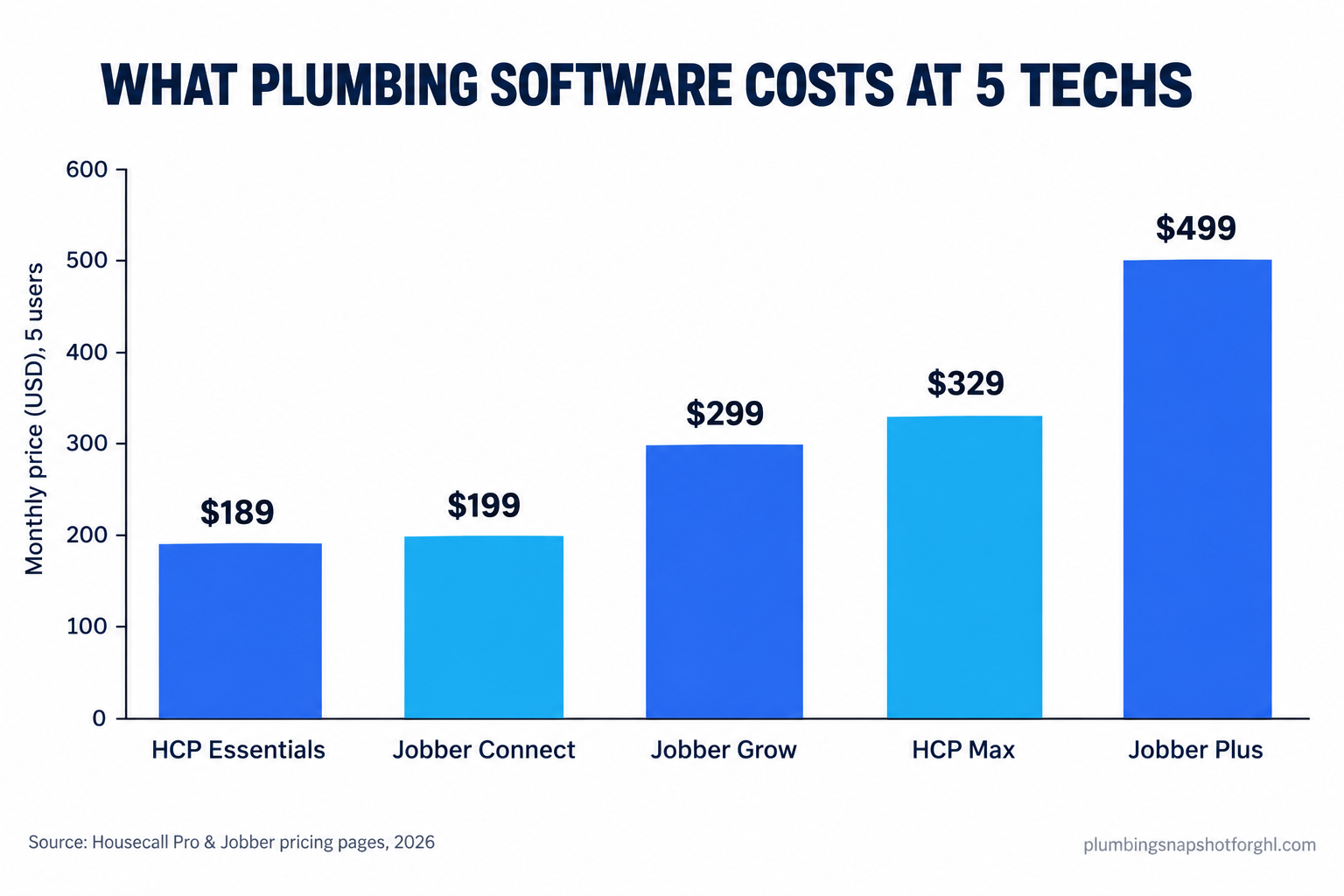
At one user, Jobber Core ($49) undercuts Housecall Pro Basic ($79). At five users the picture flips: Housecall Pro Essentials ($189) includes all five seats, while Jobber’s closest 5-user plan, Grow, lists at $299.
Published monthly list prices (not billed annually) for the plans a 5-tech plumbing shop would actually consider. Source: Housecall Pro pricing and Jobber pricing, 2026.
Essentials versus Grow, Housecall Pro wins the base-price round by $110 a month. But base price is round one; the add-ons decide the fight.
The real cost at 5 techs after add-ons
Here is the part the base price hides. The features most plumbers switch software to get, answering the phone, marketing to the list, chasing cold estimates, are not always in the base plan. This is where the two split hard.
Jobber publishes its add-on prices right on the pricing page, before you talk to anyone (Jobber pricing):
- Marketing Suite: $99/mo
- AI Receptionist: $29/mo
- Pipeline (sales follow-up): $49/mo
So a Jobber Grow shop at 5 techs that wants the AI receptionist and marketing can do the math at the kitchen table: $299 + $29 + $99 = $427/mo, or $476 with Pipeline. You know the number before you sign.
A fully loaded Jobber Grow stack for a 5-tech shop stacks to about $476/mo, every number published. Source: Jobber pricing, 2026.
Housecall Pro lists the same kinds of add-ons with no price. The pricing page names CSR AI, Voice, Campaigns, a Sales Proposal Tool, Pipeline, Payroll, and more, under a line that reads “Add-ons and extra users are optional, so you only pay for what you need” (Housecall Pro pricing). What it will not do is tell you what any of them cost. The base plan is transparent; the pieces you came for are a quote.
So on base price, Housecall Pro looks cheaper. On the all-in price for a shop that wants the phone answered and the list marketed to, you cannot compare the two from the public pages, because Housecall Pro will not show you half the bill. Make them put every add-on in writing before you believe the sticker.
Feature by feature, where it matters to a plumber
Here are the two most comparable 5-tech plans side by side.
Housecall Pro Essentials vs Jobber Grow, at 5 techs
| Plan | Housecall Pro: Essentials recommended | Jobber: Grow |
|---|---|---|
| Price | $189/mo (5 users) | $299/mo (5 users) |
| Feature 1 | 5 users included, no per-seat math | 5 users included, +$29/mo each after |
| Feature 2 | Strong mobile app, built for techs in the field | Client Hub: customers self-serve quotes and payments |
| Feature 3 | Payments: as low as 2.59% card, 1% bank | Quote follow-ups and reminders built in |
| Feature 4 | Add-ons (Voice, Campaigns, CSR AI): price on request | Add-ons published: Marketing $99, AI Receptionist $29 |
| See pricing | See pricing |
A few honest calls. Scheduling and dispatch are close to a wash, though Housecall Pro’s field app has a reputation techs like, which matters when your plumber is updating a job from a crawlspace. Quoting and estimate follow-up tilt to Jobber, whose follow-ups and client self-service are strong out of the box, and that is exactly where plumbing money leaks, in the repipe and water-heater estimates that go cold (the estimate follow-up playbook is worth ten minutes). Marketing and reviews are add-ons either way; the difference is that you can see Jobber’s price and have to ask for Housecall Pro’s.
What each one costs at three shop sizes
The right answer changes with your truck count. Same framework, three shops.
The solo operator, one truck. You need scheduling, invoicing, and payments, not a marketing suite yet. Jobber Core at $49/mo is the cheapest real entry point in the comparison; Housecall Pro Basic is $79/mo. Jobber wins on price, Housecall Pro wins if you prefer its app.
The mid-size shop, five techs. The main event. Housecall Pro Essentials at $189/mo includes all five seats and is the base-price winner. Jobber Grow at $299/mo costs more but publishes the add-ons you reach for next: with the AI receptionist and marketing you land near $427/mo, and you knew that before signing. On Housecall Pro you would be pricing Voice and Campaigns by request.
The growing shop, ten to fifteen techs. Seat math takes over. Housecall Pro Max includes 8 users at $329/mo, then $35 each: ten users is about $399/mo, fifteen about $574/mo. Jobber Grow lists $399/mo at 10 users and $499/mo at 15. At fifteen techs Housecall Pro Max ($574) sits between Jobber Grow ($499) and Plus ($699). Here the add-ons and payment fees dwarf the base-plan gap, so negotiate the bundle.
Where both tools leave a hole
Here is the thing neither pricing page says out loud. Housecall Pro and Jobber manage the job once you have it: the schedule, the invoice, the payment. Neither is built to catch the job you are about to lose at 7:40 on a Sunday night when every tech is on another call. A homeowner with water coming through the ceiling calls three plumbers in ten minutes and hires the first one that answers. Both tools can bolt on an AI receptionist, Jobber for a published $29/mo, Housecall Pro for a price you request, but answering is only step one. Answered, dispatched to the on-call tech, quoted with a photo, and followed up for the review, as one flow, is the system most shops are missing, and it is why a shop with worse software sometimes books more work than you do. We ran what that lost call is worth in the after-hours call math.
How a software switch actually goes wrong
Picking the tool is the easy part. Here is where shops get hurt, and the fix for each.
Add-on creep eats the savings. You sign for the fair base price, then discover answering, marketing, and sales follow-up are each an upcharge, and six months later your “cheaper” tool costs more than the one you passed on. The fix: price every feature you will use in writing and compare all-in numbers only.
The migration eats a season. Moving years of jobs, customers, and photos into a new system during your busy months is how a shop loses a week of dispatch to a spreadsheet. The fix: migrate in your slow season and run both systems in parallel for two weeks before you cut over.
The data-export trap. Your customer list and job history are the business. Before you move in, ask in writing: “If I cancel, can I export all customer and job data at no charge?” A vague answer is your answer.
SMS stops delivering on day one. Your “tech is on the way” and review-request texts run over the A2P 10DLC system, and if your number is not registered right, they silently fail. You think the feature is on; the customer never got the text. The fix is in the next section, because it is also the law.
Staying legal when the software texts your customers
Every tool here can text your customers, and that is where the compliance line sits, whichever vendor you pick.
TCPA means you need consent to text. The Telephone Consumer Protection Act governs business texting, and sending reminder or marketing texts without the right prior consent carries real per-message penalties (FCC on the TCPA). A customer handing you their number to book a job is not blanket consent to a marketing blast, so your intake has to capture the opt-in in plain language, and we walk the exact wording in TCPA compliance for plumbing SMS.
A2P 10DLC registration is not optional. Business texting runs over the A2P 10DLC framework, and carriers filter or block unregistered traffic. Confirm your number is registered and your messages carry opt-out language before you trust an automated text.
Steal these: the email and texts that do the work
Here is the copy that turns this comparison into a decision and a booked job.
The email that forces a full quote out of either rep. Base prices are public; the all-in price is not. Send this before any demo:
Subject: Full monthly cost for a 5-tech plumbing shop
Hi [name], before we book a demo I want the all-in monthly number in writing. For a 5-technician residential plumbing shop, please send:
- Base plan and what seat count it includes, plus cost per extra user.
- Price for the AI receptionist / after-hours answering add-on.
- Price for the marketing / review-request tools.
- Payment processing rate for card and for bank/ACH.
- Any onboarding or setup fee, contract length, and the data-export policy if we cancel.
A single all-in monthly figure for that setup is what I am comparing. Thanks.
Any rep who answers in writing is one you can trust. Any rep who routes you to a call instead told you something too.
The after-hours missed-call text-back. Fire this automatically the second a call goes unanswered:
“Hi, this is [Shop Name]. Sorry we missed you, we’re on another job. Is this a plumbing emergency? Reply YES and we’ll call you right back. For non-urgent requests, book here: [link]. Reply STOP to opt out.”
The review request, same day the job closes. This is the one that compounds:
“Thanks for choosing [Shop Name], [first name]. [Tech] said the [job] went smoothly. A quick Google review helps your neighbors find us: [link]. If anything wasn’t perfect, reply here first and we’ll make it right. Reply STOP to opt out.”
Notice the negative-feedback catch in that last one. It routes an unhappy customer to you by text instead of to a one-star review in public, and that single line is worth more than most marketing add-ons.
Objections
“I already pay for ServiceTitan and it’s a lot.” Then you are the exact shop this comparison is for. ServiceTitan is built for larger operations and priced per tech behind a demo. At one to five trucks, Housecall Pro or Jobber will almost certainly cost less and fit your size better, and the switch often pays for itself in a few months.
“Won’t customers find the automated texts annoying?” Not when the text is useful and timed right. A “tech is on the way” text and a same-day review request are things customers actually want. The annoyance comes from blasting a marketing list with no consent, which the TCPA section above helps you avoid.
“Isn’t the cheaper base plan just the better deal?” Only if you stop at the base plan, and plumbing shops never do. A shop that buys Housecall Pro Essentials for $189 and then pays request-a-quote prices for Voice and Campaigns can end up above the Jobber shop that paid $299 and saw every add-on upfront. Compare the all-in number, not the cover price.
Frequently asked questions
Is Housecall Pro or Jobber cheaper for a 5-tech plumbing shop?
On base price, Housecall Pro wins: Essentials lists at $189/mo for 5 users versus Jobber Grow at $299/mo (2026 published prices). But Jobber publishes its add-on prices while Housecall Pro does not, so the all-in cost depends on which pieces you add. Compare the full monthly figure, not the base plan.
Does Housecall Pro or Jobber include an AI receptionist?
Both offer it as a paid add-on, not in the base plan. Jobber publishes an AI Receptionist add-on at $29/mo. Housecall Pro lists Voice and CSR AI add-ons without prices, so you request a quote. Answering is only step one; dispatch, quoting, and review follow-up still need wiring together.
How much are extra users on each platform?
Jobber charges $29/mo per additional user. Housecall Pro's Max plan includes 8 users and then $35/mo per extra user. Both price per seat, so the bill climbs as you add trucks. Price your plan at the team size you expect in 18 months.
Do Housecall Pro and Jobber replace ServiceTitan?
For most one-to-five-truck residential shops, yes, and usually for less. ServiceTitan is built for larger operations, hides pricing behind a demo, and has stated it is not optimized for shops with three or fewer techs. Both publish prices and fit smaller teams better.
Will my automated texts actually reach customers?
Only if your number is registered under the A2P 10DLC framework and your messages include opt-out language. Unregistered business texting gets filtered or blocked, and texting without proper consent can carry TCPA penalties. Confirm registration and consent wording on whichever tool you pick.
What do Housecall Pro and Jobber not do for a plumbing shop?
Neither is built to catch the after-hours emergency call you are about to lose. They manage jobs you already have. Answering a 2 AM burst-pipe call, dispatching the on-call tech, sending a photo quote, and chasing the review as one flow is a separate system most shops leave to voicemail.
The price comparison is the easy part. Both run your jobs well, and at one to five trucks either is a fair choice once you compare the all-in number instead of the sticker. Jobber earns the edge on transparency and quote follow-up; Housecall Pro on base price and its field app. The harder question is the one neither pricing page answers: what catches the emergency call when every truck is busy. That is a different purchase, and the shops that win the 2 AM burst pipe built a system for it.