
It’s 4:50 on a Friday and your best tech just finished a water heater swap. The customer’s happy, the install’s clean. Then the tech says the sentence that quietly drains plumbing shops: “No problem, just mail us a check.” That check shows up in eleven days, or it doesn’t, and now your office is calling a stranger for money you already earned. The cash doesn’t leak out of a plumbing business on the jobs you lose. It leaks out of the jobs you won and never closed: tickets sitting unbilled on a clipboard, and techs who left without collecting. Getting paid faster isn’t a tougher phone call. It’s a system that collects before the truck leaves and chases the handful who slip through.
In this guide
- Where plumbing money actually leaks
- What getting paid slow costs you
- The six-stage closeout system
- Stage 1. Price it before the wrench turns
- Stage 2. Take a deposit on the big jobs
- Stage 3. Invoice before you leave
- Stage 4. Make paying take ten seconds
- Stage 5. Chase stragglers on autopilot
- Stage 6. The weekly unbilled review
- What the card actually costs you
- The compliance you can’t skip
- Solo, 5-truck, and 15-truck
- Steal this: the closeout scripts
- Objections, answered straight
- Frequently asked questions
Where plumbing money actually leaks
Ask most owners where they lose money and they’ll point at the phone: missed calls, slow leads, the shop across town. All real. But there’s a quieter, often bigger leak: money you already earned and let dribble away.
It looks like this. A paper ticket sits in a truck for three days before anyone enters it. A tech says “the office will send a bill,” so no payment happens on-site and now you’re a creditor. A repipe gets done on a handshake with no deposit, so you bought $3,000 of pipe on your own dime. These aren’t lost jobs. They’re won jobs that leak.
Here’s the strange part: you’re in the best possible position to get paid instantly. The customer is standing in front of your tech, the work is done, and they have a card in their pocket. That’s a huge structural advantage over commercial work, where subcontractors bill and then wait. The only thing between you and same-day cash is a process that uses it.
What getting paid slow really costs you
Slow and missed collection costs you three ways. Bad debt: a balance you don’t collect on-site can go to zero, because the longer an invoice ages the less you see. Float: skip the deposit on a water heater and you’ve lent the customer that material cost interest-free, and a few big jobs at once can leave you profitable on paper and short on payroll Friday. Labor: hours a week spent printing, mailing, calling, and re-sending to collect cash you should already have.
This isn’t about more leads. It’s about closing out the jobs you already have, in a trade the Bureau of Labor Statistics expects to grow 7% through 2035 (BLS). The work is there; the question is whether you keep the money.
The six-stage closeout system
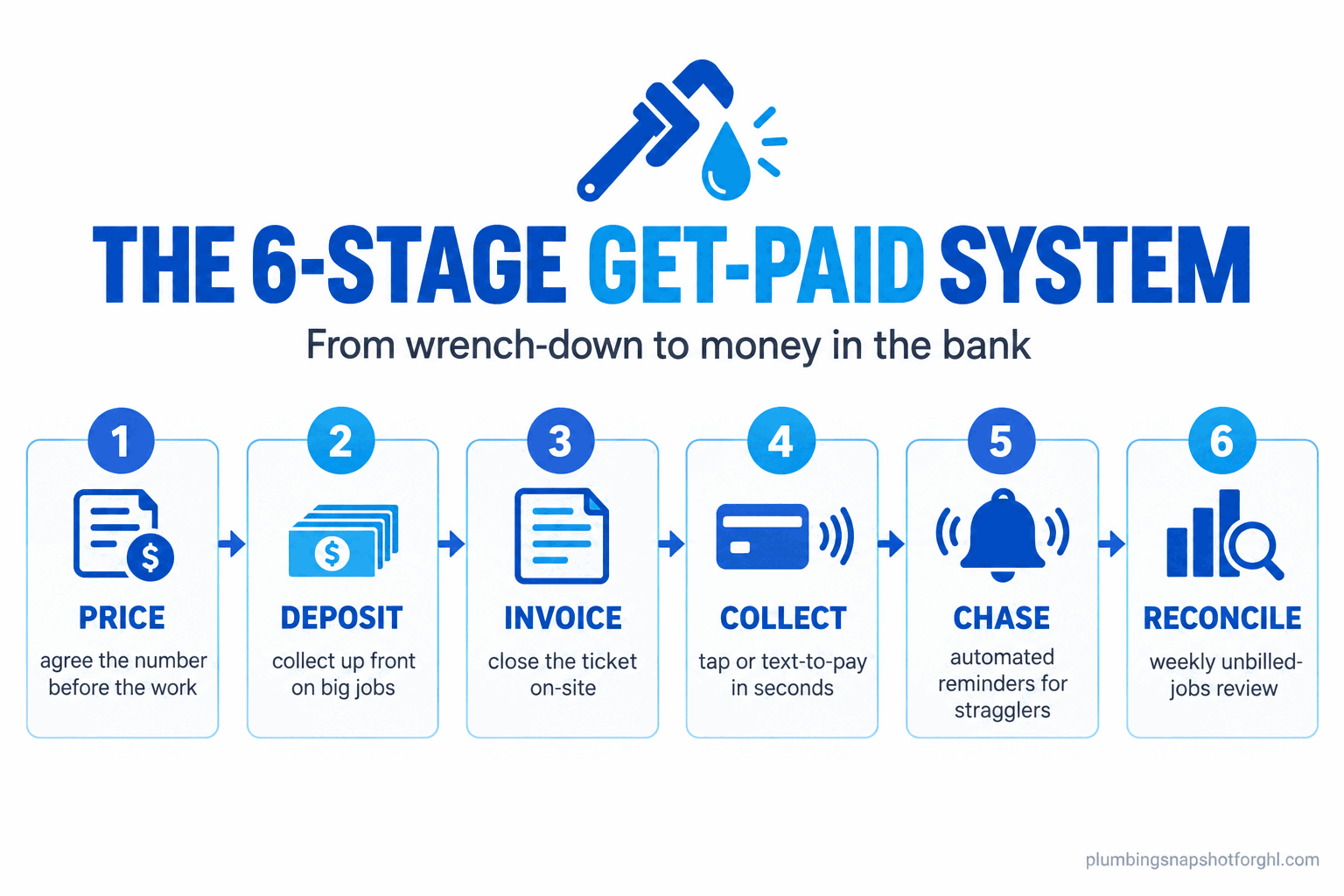
Every job that turns into money-in-the-bank passes through the same six stages, and breaking one leaks cash: Price (agree the number before the work), Deposit (collect up front on big jobs), Invoice (close the ticket on-site), Collect (make paying take seconds), Chase (automate reminders for the few who slip), and Reconcile (a weekly review so nothing sits unbilled).
Stage 1. Price it before the wrench turns
You can’t collect cleanly on a number the customer didn’t agree to. The most common reason a residential payment stalls is a surprise: they expected one figure and saw another. The fix is a flat-rate price approved before the tech starts, so the end of the job is just “the number we agreed on.” No price book yet? Build one first: the flat-rate price book guide walks through how, and how to set your true billable rate makes sure the numbers make you money.
How it breaks: the tech ballparks it verbally, the invoice comes in higher, and now you’re negotiating instead of collecting. Lock the price in writing.
Stage 2. Take a deposit on the big jobs
Small service calls get paid in full on-site. Deposits are for jobs where you buy real material before you show up: repipes, water heater and tankless swaps, sewer work. Collect it when the customer approves, before you order parts. It stops you floating the manufacturer’s inventory out of your own account, and it filters out the tire-kicker who approves a $4,000 repipe and goes quiet. Collect a third to half up front, with the balance on completion. For jobs the homeowner wants to spread out, hand them to financing instead of carrying the balance yourself (how plumbing financing works). Even the big platforms lean here: ServiceTitan added integrated financing and Tap to Pay in January 2026 (ServiceTitan).
How it breaks: you skip the deposit to “be easy,” buy the materials, and the job cancels, leaving you holding a water heater and pipe with no customer. Make a deposit standard above a set threshold, and make it what triggers the parts order.
Stage 3. Invoice before you leave the driveway
The invoice has to be created and presented on-site, while the customer is still there and happy. The moment it becomes “the office will send it later,” you’ve turned an instant payment into an accounts-receivable problem. The tech closes the ticket in the field the second the work is done, and the system generates the invoice right there so the customer pays before the van pulls away. That’s the real reason a mobile field app matters: timing, not paperwork.
How it breaks: paper tickets. The tech writes it by hand, the slip rides around for three days, and someone finally emails a bill to a customer who’s moved on. Every hour between “job done” and “invoice sent” is an hour the money can slip.
Stage 4. Make paying take ten seconds
People pay what’s easy. If your only options are cash or check, you’ve built friction into the exact moment you need none: the customer “has to run to the bank,” the check is “in the mail,” and you’re waiting. Put card on the tech’s phone (tap-to-pay or a small reader), plus a text-to-pay link for anyone who’d rather not hand over a card in person. A two-way SMS channel makes this painless: the pay link rides the same thread as your confirmations.
How it breaks: you offer one method and it’s the slow one, or you take cards but default to the priciest way to run them (keyed in at 3.49%) instead of the cheapest (a field tap at 2.59%). Default techs to the in-person tap, and keep ACH for big balances.
Stage 5. Chase the stragglers on autopilot
No matter how good your on-site collection gets, a few balances slip through: the card declined, they only had a check, they left in a hurry. For those you need an automatic reminder sequence, so nobody has to remember to chase.
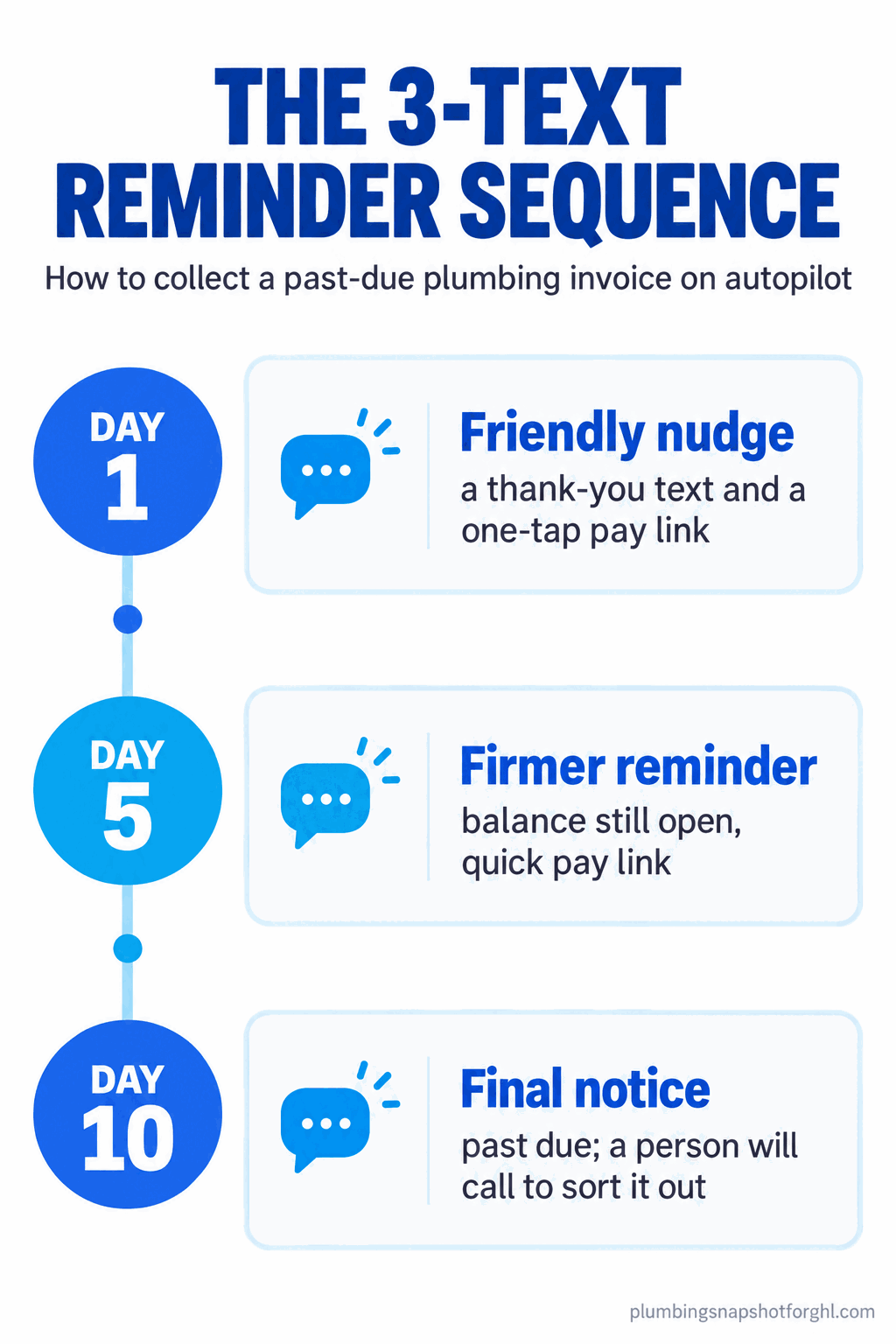
A three-step sequence collects most of it: a friendly text with a pay link the moment the balance exists, a firmer reminder on day five, a final notice on day ten that a person will call. Each carries the pay link, so the customer clears it in one tap and a human only calls for the rare account that ignores all three. The same discipline recovers unsold estimates too.
How it breaks: the chase depends on a person remembering. Someone’s out sick, it’s a busy week, and the straggler invoices age into bad debt. Automate the first three touches so the only thing a human does is make the one call automation couldn’t close.
Stage 6. Run the unbilled-jobs review weekly
The backstop is a short weekly review: pull a list of completed jobs with an open balance or no invoice, and work it until it’s empty. You’re looking for jobs marked complete with no invoice (a ticket that never got closed), and invoices sent with no payment (a straggler for the Stage 5 sequence). Usually the fix is obvious: a forgotten ticket, a declined card nobody noticed, a deposit never applied.
How it breaks: there is no review, so “unbilled” stays invisible until cash gets tight, by which point the jobs are months old and half the money is gone. Put a standing 15-minute slot on the calendar and make the open-balance list someone’s job.
What the card actually costs you
The method you collect by changes your processing bill, and most shops never look. Housecall Pro, which lists its rates openly, charges 2.59% for a card tapped in the field, 2.99% for a digitally sent invoice, and 3.49% when staff key it in or run a card on file, with ACH at 1% (Housecall Pro). Online card pricing elsewhere, including the Stripe rails a GoHighLevel setup runs on, sits around 2.9% plus 30 cents (Stripe). Here’s what that spread does to a shop running $40,000 a month in card volume:
Estimated monthly processing cost on $40,000 of card volume, by method, using Housecall Pro’s published rates (Housecall Pro). Field tap versus office-keyed is about $4,300 a year on the same revenue.
Here’s how the common options stack up on cost, published rates, and whether they handle deposits and text-to-pay without a bolt-on.
| Platform | Card rate | ACH | Deposits / progress billing | Text-to-pay | Rate published? |
|---|---|---|---|---|---|
| Housecall Pro | 2.59%-3.49% | 1% | Yes | Yes | Yes, openly |
| ServiceTitan | Not published (negotiated) | Not published | Yes | Yes (Tap to Pay, 2026) | No, demo only |
| Jobber | High-2% range (third-party) | ~1% | Yes | Yes | Not officially |
| GoHighLevel + Stripe | ~2.9% + 30¢ | Via Stripe | Yes, with workflow setup | Yes | Yes (Stripe’s rate) |
ServiceTitan’s payment pricing, like its software pricing, is negotiated behind a demo (see what plumbing software actually costs in 2026 and the ServiceTitan teardown). The lesson for collection: default to an in-person tap, and push big balances to ACH, where 1% saves real money on a $6,000 repipe.
The compliance stuff you can’t skip
Two rules touch how you collect. First, surcharging. If you’re tempted to pass the card fee to the customer, the rules vary hard by state: it’s effectively banned in Connecticut and Massachusetts, the networks cap any surcharge at the cost of acceptance (Visa limits it to 3%), and you can never surcharge a debit card anywhere (CardFellow). California requires the fee built into your listed price. Check your state first, and when in doubt, build the cost into your flat rate instead of surcharging.
Second, consent for those reminder texts. A balance-due text to a customer you just served is generally fine as a transactional message, but the moment reminders blur into marketing you’re in TCPA and carrier-registration territory. Collect clear consent to text at booking and keep payment messages about the payment. Our TCPA guide for plumbers covers the consent language and the 10DLC registration that keeps texts legal.
Solo, 5-truck, and 15-truck
The system is the same at every size. What changes is who does each stage, and how much you automate.
Solo owner-operator. You’re the tech, the office, and collections, so the win is cutting steps. Present a flat-rate price on your phone, collect by tap or text-to-pay before you leave, and let an automated reminder handle the rare straggler. The biggest leak at your size is the “I’ll bill you later” habit at the end of a long day. Kill it.
Five-truck shop. Now the leak moves to your techs. On-site invoicing becomes the rule: tickets close in the field or they don’t close. Set a standard that no tech leaves a completed job without either collecting or logging why not, and run the weekly review religiously, because a forgotten ticket is invisible until you look.
Ten-to-fifteen trucks. Here the problem is drift. Small percentages of unbilled jobs across a dozen trucks add up to real money no human can track in their head. You need automation doing the work: invoices on job completion, deposit requests on approval, the AR sequence running itself, and a dashboard of open balances by tech. A platform like GoHighLevel, wired to your field app, holds it together.
Steal this: the closeout scripts
Copy these, change the names, use them.
Deposit request (on big-job approval):
“Great, I’ve got you down for the [water heater install] at [price]. To order your parts and lock your spot, we collect a [50%] deposit of [$X] today, balance due when the work’s done. Secure link: [pay link]. Once that’s in, I’ll order materials and we’re set for [date].”
On-site, job complete (the tech’s line):
“All done, and I tested it twice. Your total is [$X], same as we agreed. I can tap your card right here, or text you a link to pay from your phone. Which works?”
It assumes payment now, names the agreed price, and offers two easy ways. It never says “we’ll bill you.”
The three automated AR texts:
Day 1: “Hi [name], this is [shop] following up on your [service] today. Your balance is [$X]. Pay in one tap here: [pay link]. Thanks for having us out.”
Day 5: “Hi [name], a reminder that your [$X] balance for your [service] is still open. Quick link: [pay link].”
Day 10: “Hi [name], your [$X] balance from [date] is now past due. Please settle it here [pay link] in the next few days, or [name] from our office will call to sort it out.”
For maintenance-plan members, store a card on file with clear consent and their recurring work bills itself: the quiet engine of a predictable month.
Objections, answered straight
“Won’t asking for payment on-site feel pushy?” It feels pushy only when the price is a surprise. When the customer approved the number before the work started, “that’s the total we agreed on, tap here” is just the natural end of the job. Fix the pricing (Stage 1) first.
“My customers are older, they pay by check.” Keep taking checks. But that’s no reason to make check the only option, which is the default when you offer nothing else. Add the tap and text-to-pay link too, and you’ll be surprised how many “check” customers pay by phone when it’s right in front of them.
“I already pay for ServiceTitan or Housecall Pro. Doesn’t it handle this?” The tools exist in most platforms; the system is what’s missing. A text-to-pay feature isn’t the same as every tech defaulting to it, deposits being standard, and a reminder sequence that runs. If your platform has the buttons and your cash is still leaking, you have a process gap, not a software gap.
“I don’t have time to set up another system.” You don’t have time to keep chasing money you already earned, either. Setup is a few hours once: a price book, a deposit threshold, on-site invoicing turned on, a three-text sequence, and a weekly review. Then it runs itself.
Frequently asked questions
How can a plumber get paid faster?
Collect on the visit instead of billing afterward. Agree the price before the work, take a deposit on big material jobs, present the invoice on-site the moment the job is done, and offer a tap or text-to-pay link so paying takes seconds. For the few balances that slip, run an automated three-text reminder sequence.
Should plumbers take a deposit before starting a job?
On big jobs, yes. For repipes, water heater installs, and sewer work where you buy significant materials before you show up, collect a deposit (often a third to half) when the customer approves. It stops you floating the material cost out of your own account and filters out customers who go quiet. Small service calls get paid in full on-site instead.
What does it cost a plumber to accept credit cards?
It depends on the method. On Housecall Pro's published rates, a card tapped in the field is 2.59%, a digitally sent invoice is 2.99%, and a card keyed in by office staff is 3.49%, while ACH is 1%. Online card pricing on platforms like Stripe runs about 2.9% plus 30 cents. An in-person tap is the cheapest way to run a card.
How do I get customers to pay an overdue plumbing invoice?
Automate the reminders so nobody has to remember to chase. A friendly text with a pay link on day one, a firmer reminder around day five, and a final notice around day ten that a person will call. Every message carries a one-tap pay link, so a human only calls for the rare account that ignores all three.
Can I charge customers a credit card fee as a plumber?
Sometimes, but rules vary by state. Surcharging is effectively banned in Connecticut and Massachusetts, any surcharge is capped at your cost of acceptance (Visa limits it to 3%), and you can never surcharge a debit card anywhere. California requires the fee baked into your listed price. When in doubt, build the cost into your flat rate.
Yvonne runs partner success for agencies that resell the Plumbing Snapshot, and she spends her days on the boring money: deposits, membership billing, and the collection automations that keep a plumbing brand’s cash moving. Related reading: the flat-rate price book guide, plumbing financing and payment plans, and the maintenance-plan flywheel.