

It is 7:10 AM. The board looks clean. Four stops for each truck, a water heater at nine, a drain call across town at two. By 10:15 it is a wreck. A no-show ate the first slot. A “quick” cartridge job turned into a shutoff you had to drive across the county for a part. An emergency came in and you jammed it between two jobs that were already back to back, so now both customers are calling asking where your guy is. You spend the rest of the day on the phone apologizing and nobody is making money.
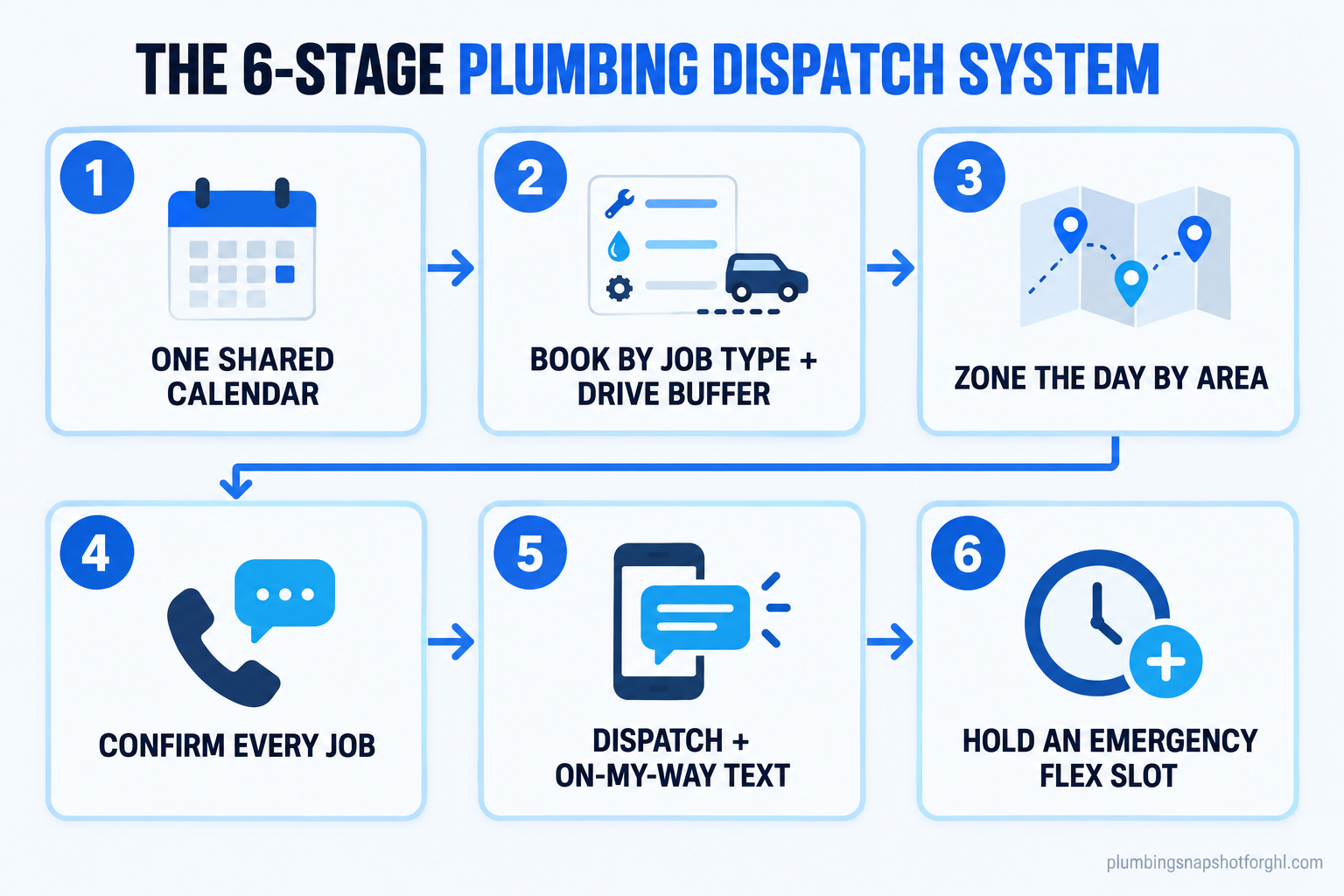
Plumbing dispatching is not a “my guys are slow” problem. It is a system problem, and the fix is the same six moves every time: one shared calendar, booking by real job length with a drive buffer, zoning the day by area, confirming every job before it happens, dispatching with clear arrival texts, and holding room for the emergency you know is coming. Field service techs lose a big chunk of every day to driving and slack time. ServiceTitan estimates the average service technician spends 28% of the workday behind the wheel (ServiceTitan), and research cited by Lessen puts total lost time (driving, idle, and scheduling gaps) at more than 40% of the day (Lessen / Geotab). This is the full playbook: why the schedule breaks, what it costs, the six-stage system that holds, the exact texts to send, and how it changes as you add trucks.
In this guide
- Why your plumbing schedule falls apart
- What a chaotic schedule actually costs you
- The 6-stage plumbing dispatch system
- Steal this: the exact dispatch texts and scripts
- How dispatching changes by shop size
- Common objections, answered
- Frequently asked questions
Why your plumbing schedule falls apart
The morning board is a prediction, and most shops make a bad one. The schedule does not break because your techs are lazy. It breaks because of five things that happen on almost every route, and none of them are a surprise once you name them.
You book by slot, not by job. A “faucet repair” and a “no hot water, two-story, 40-gallon in the attic” get the same two-hour box. One of them blows the box every time, and the overrun knocks the rest of the day down like dominoes.
You leave no room to drive. The calendar says nine, eleven, and one. It does not know that nine is six miles north and eleven is twenty minutes south in traffic. Drive time is invisible on the board but very real in the truck, which is why it eats the day.
Parts send your tech backward. A tech without the right part drives to a supplier, waits at the counter, and drives back. A utility-sector review pinned much of field driving on exactly this, leaving the job to chase inventory (Utility Magazine).
Emergencies land on a full board. The 2 AM burst pipe is the job you want most and the one that wrecks the schedule the worst, because you shove it between two stops that were already tight. Without a mapped after-hours on-call rotation, every emergency is a fire drill.
Nobody confirmed the job. You are driving to a house where the customer forgot, went to work, or booked somebody else two days ago. That is a dry run: fuel, an hour, and a slot you could have sold, all gone.
What a chaotic schedule actually costs you
Owners feel the chaos as stress. The business feels it as three leaks: wasted drive time, dead slots from no-shows, and jobs that walk because you could not fit them in.
Start with the drive. If a tech gives up 28% of an eight-hour day to the windshield, that is well over two hours a day not billing (ServiceTitan). Vendor reviews put the range at 15% to 30% of the workday (Fieldproxy), so even a conservative number is an hour-plus a day, per truck, gone. You still pay the wage while the truck rolls empty. At the trade’s median $30.67 an hour in wages alone (U.S. Bureau of Labor Statistics), you pay a plumber to sit at red lights before you count a dime of lost billing.
Share of a field technician’s workday lost to driving and slack, by source. Sources: ServiceTitan, Lessen / Geotab, Fieldproxy.
Then the dead slots. Studies of booked appointments put the average no-show rate near 23% (PMC systematic review). It is a healthcare proxy, but the behavior is identical: a customer books ahead and forgets. Every no-show is an empty box that could have been a $340 service call or a $1,345 water-heater swap (Angi).
Last, the window. Customers do not grade you on whether you fixed the leak, they grade you on whether you showed up when you said. In a 2026 survey, 85% said arriving inside the quoted window is extremely or very important, ranking home-service pros just behind doctors on who most needs to be on time (One Hour Heating & Air Conditioning). Blow the window and you lose the job, the review, and the referral.
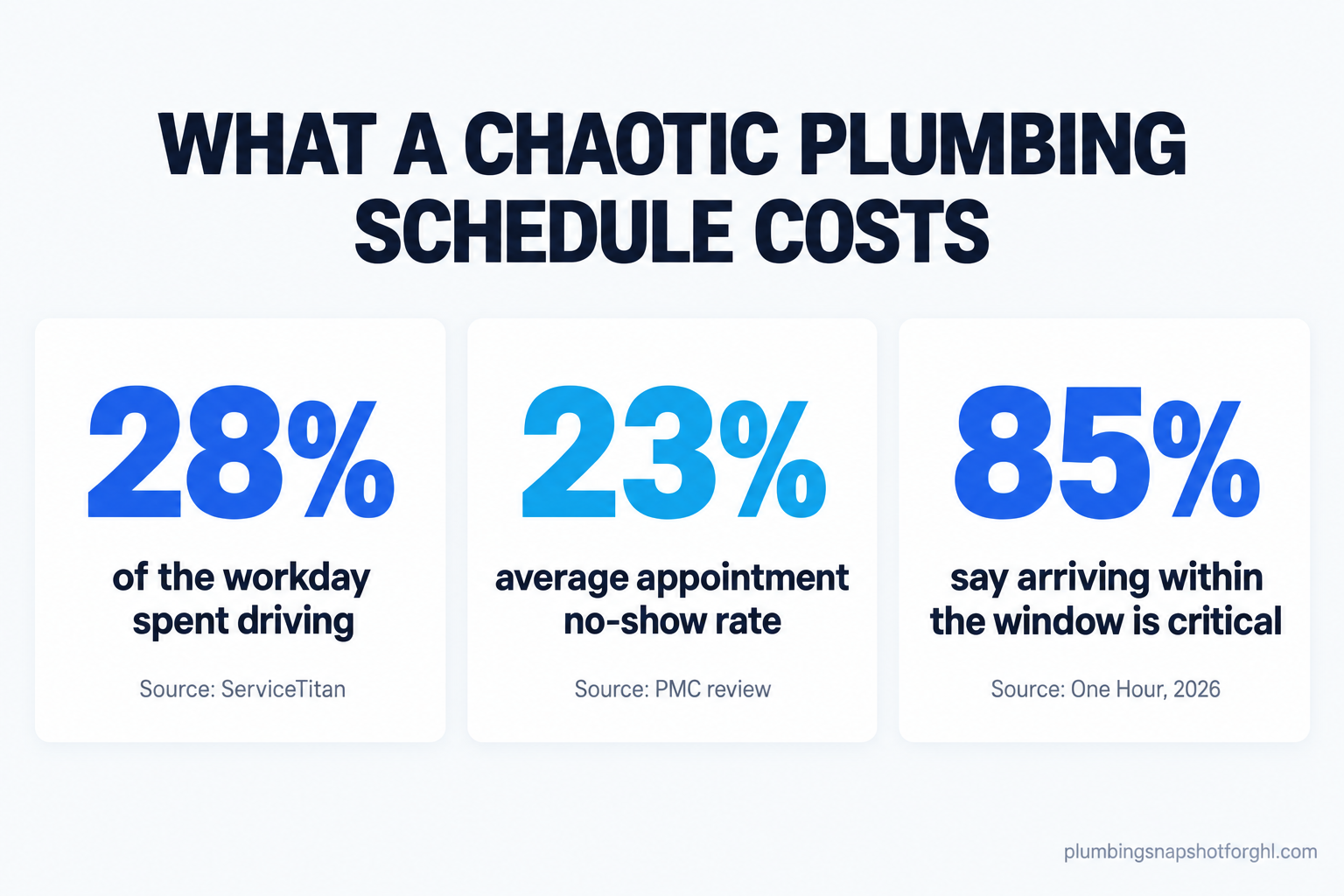
Add the three up: a truck that could run six stops is running four, two booked jobs evaporated, and the customers you did reach are annoyed you were late. That is not a staffing problem you fix by hiring. It is a dispatch problem you fix with a system.
The 6-stage plumbing dispatch system
Here is the system that holds. Each stage has the setup and, more important, how it breaks and what to do when it does. Build them in order. You do not need new software to start, just discipline and a shared calendar, which a platform like GoHighLevel can provide once the habit is set.
Stage 1: One shared calendar, one source of truth
Everyone looks at the same board: you, the techs, and whoever answers the phone. No sticky notes, no “I told Mike in the truck,” no second calendar on your personal phone. When a job is booked, confirmed, or moved, it changes in one place and everyone sees it live.
How it breaks: someone books a job verbally and never puts it on the board, so you double-book the slot. The fix is a hard rule: if it is not on the calendar, it does not exist, and the only way on is the booking flow (phone, web form, or online booking and reminders). No exceptions, including for you.
Stage 2: Book by job type, with a drive buffer baked in
Stop booking two-hour boxes for everything. Build a short menu of job types with a realistic duration: service call 60 minutes, drain clear 90, water-heater swap 180, repipe is a day. Then add travel to the block itself, so a 60-minute job across town occupies 90 minutes on the board, not 60.
How it breaks: your durations are optimistic because you timed your best tech on a good day. Pad them. A job that finishes early is a gift; one that runs 40 minutes long takes down everything after it. Review your real average time per job type once a quarter.
Stage 3: Zone the day by area, not by order of the phone ringing
Group each truck’s stops by neighborhood or zip, so the morning is one side of town and the afternoon is the other. You are not buying route-optimization software to do this, you are just refusing to send a truck north, south, north, south. This is where you win back the drive time from the cost section.
How it breaks: emergencies and “can you squeeze me in” calls fight the zones. Hold the line on non-urgent work and offer the caller your next open slot in their zone, not anywhere. “I can have someone in your area Thursday morning” beats a truck zig-zagging the metro today.
Stage 4: Confirm every single job before the truck rolls
An unconfirmed appointment is a coin flip. Automate a confirmation the moment the job is booked, a reminder the day before, and a heads-up the morning of, each with a one-tap way to confirm or reschedule. Text, not a call, because a text is opened about 98% of the time (Omnisend) and automated reminders have cut no-shows by up to 38% (Klara). Full cadence in our no-show playbook.
How it breaks: you send the confirmation but never watch the replies, so a “can we do Friday” sits unread and the tech drives to an empty house. Route reschedule replies to whoever runs the board, and move the slot before the truck leaves.
Stage 5: Dispatch with a real arrival window and an “on my way” text
When the tech is assigned and rolling, the customer gets a text: who is coming, and a tight window. Narrower is better, because the window is what you are judged on (One Hour, 2026). A customer who gets a name and a 30-minute window stops calling the office to ask where the plumber is, which frees the phone for new jobs.
How it breaks: the tech runs long at stop two and never tells anyone, so stop three gets a plumber 90 minutes late with no warning. Build a one-tap “running late” text the tech can fire from the truck. People forgive late; they do not forgive silence.
Stage 6: Hold room for the emergency you know is coming
You will get an emergency today or tomorrow. Stop pretending you won’t. Leave one flex slot per truck per day, usually mid-afternoon, and route true emergencies there or to the on-call tech instead of cramming them between booked jobs. Pair this with missed-call text-back so the emergency that rings while you are on another line gets caught in seconds.
How it breaks: a quiet day tempts you to sell the flex slot, and then the emergency lands on a full board and everything collapses. Protect it like a paying job. On a slow day, use it for a callback or a maintenance visit, never a third stop in the wrong zone.
The same four trucks, two different systems
Two-hour boxes for every job. No drive buffer, so overruns cascade. Stops scattered across the metro. Confirmations are a hope. Emergencies crammed between tight jobs. The owner spends the afternoon apologizing, and two booked jobs no-show.
Jobs sized to real duration with travel baked in. Day zoned by area. Every job auto-confirmed. Tight arrival windows and on-my-way texts. A protected flex slot absorbs the emergency. Each truck fits one more paying stop and the windows hold.
Steal this: the exact dispatch texts and scripts
This is the part to copy today. These are the messages that run stages 4 and 5, written for a plumbing customer and short enough to read on a phone. Keep your shop name and a real reply path in every one. If you send them as automated texts, you need the customer’s consent on file and a working opt-out, which is not optional under the TCPA, so read our plumbing TCPA guide first.
Notice two things: every message gives a one-tap action, and every message names a human. Automated does not have to read like a robot. The reschedule text offers slots in the customer’s zone, which protects stage three. And the job-complete text hands dispatch off to reputation, turning a clean visit into the review that wins the next one.
How dispatching changes by shop size
The six stages are the same at every size. What changes is who runs the board and where it breaks first.
Solo or one truck. You are the dispatcher, the tech, and the phone. Your enemy is the mid-job interruption: you are elbow-deep in a disposal when a call comes in, and you either let it ring (lost job) or stop to answer (angry customer in front of you). Automation does the dispatching you cannot do with your hands full. Missed-call text-back catches the ring, auto-confirmations keep tomorrow’s slots alive, and on-my-way texts replace fielding “where are you” calls. You do not need zoning software, you need to stop losing the job that calls while you work. Know your true billable rate so you know which interruptions are worth stopping for.
Three to five trucks. This is where a loose system turns into a bottleneck, because one person is dispatching by memory while the phone rings. The break point is the shared calendar: the moment two people can book the same slot, you double-book and a truck drives to a job that is not there. Lock stage one before you grow. Zoning starts paying real money here, because sending trucks in circles becomes a daily tax. One person, or one good automated booking flow, should own the board.
Eight to fifteen trucks. Now the problem is drive time at scale, where small inefficiencies multiply across a dozen trucks and windshield time becomes a five- or six-figure line item. It is also where techs who spend half the day driving start to quit: ServiceTitan found techs who drive more than 50 minutes for over 20% of jobs are 27% more likely to churn (ServiceTitan). Here the flex-slot rule and tight zoning are how you keep both your schedule and your crew. You may graduate to route-optimization tooling on top of the calendar, but only after the six stages are habit, not instead of them.
Common objections, answered
“My business is too unpredictable to schedule like this.” Every shop says this, and every one has the same predictable week once you track it. Emergencies are not random, they are a steady percentage of your volume. That is the point of the flex slot: you cannot predict which day the burst pipe comes, but you can predict that one will, so you reserve room. The system is built for the chaos, not in spite of it.
“Won’t the automated texts annoy customers?” The opposite. Customers are annoyed by silence and blown windows, not by a clear heads-up, and 85% rank arriving in the window as critical (One Hour, 2026). A name and a window is a courtesy. The only annoying text is the one with no opt-out, which is why consent and a reply-STOP path are built in, not bolted on.
“I already pay for ServiceTitan, Housecall Pro, or Jobber.” Then you already have a calendar, so the software is not your gap, the process is. The six stages are a way of working. Book by job type, add the drive buffer, zone the day, confirm everything, and hold the flex slot inside whatever tool you pay for. If you are rethinking that tool, we break down what plumbing software actually costs in 2026.
“I don’t have time to set this up.” You do not have time not to. The setup is a few hours once; the chaos is a few hours every day. Start with stage one and stage four this week, the shared calendar and auto-confirmations, because together they stop the two most expensive failures: double-booking and no-shows. Or install a done-for-you system and skip the build entirely.
Frequently asked questions
What is plumbing dispatching, exactly?
Dispatching is assigning jobs to trucks, sequencing them through the day, and telling customers when to expect you. Good dispatching books by real job length with travel built in, groups stops by area, confirms every appointment, and holds room for emergencies, so one overrun or no-show does not sink the rest of the day.
Do I need dispatch software, or can I start with a calendar?
Start with one shared calendar and a set of rules. The six stages are process, not product. Software helps most with automated confirmations, on-my-way texts, and zoning at scale, but a solo operator can run the system with one calendar and a few automated texts before buying anything bigger.
How much drive time can a small plumbing shop realistically cut?
Techs spend an estimated 15% to 30% of the day driving, much of it backtracking across town or chasing parts (ServiceTitan; Fieldproxy). Zoning the day and stocking trucks for common jobs claws back 30 to 60 minutes per truck per day for most shops. That is often one more paying stop, worth real money at a typical $340 service call.
How do I schedule emergencies without wrecking the whole day?
Hold one flex slot per truck per day and route true emergencies there or to your on-call tech, instead of cramming them between two booked jobs. Pair it with missed-call text-back so a call that rings while you are busy gets caught in seconds. Protect the flex slot; do not sell it just because the morning looks quiet.
What should the arrival window be?
As narrow as you can honestly keep. Customers judge you on the window far more than the repair, with 85% calling on-time arrival critical (One Hour, 2026). A wider booking window plus an on-my-way text that tightens it to 30 minutes beats a vague 'sometime today.'
Are automated appointment texts legal for a plumbing business?
Yes, with the customer's prior consent and a clear opt-out. Automated SMS falls under the TCPA, so you need consent on file and a working reply-STOP path before you turn the sequence on. Transactional texts about a job the customer booked are lower-risk than marketing blasts, but consent and opt-out are still required.
Back to that 10 AM
Run the morning again with the system. The no-show never happened because the job confirmed itself the night before and you moved it at 7:30. The cartridge job did not send anyone backward because the truck was stocked for common repairs. The emergency landed in the flex slot you held on purpose. Customers got a name, a window, and an on-my-way text, so the phone stayed quiet for new work instead of lighting up with “where is your guy.” Four trucks ran six clean stops instead of four messy ones, and you spent the afternoon quoting a repipe instead of apologizing.
That is the difference between a schedule that is a wish and one that is a system. Build the six stages by hand inside the calendar you already have, starting with the shared board and auto-confirmations this week, or have the whole flow installed and skip the trial and error. Either way, the goal is the same: a day that still looks like the plan at 10 AM.